

Table of Contents
The best goal tracking apps in 2026 are Griply, GoalsOnTrack, ClickUp, Strides, TickTick, Todoist, Notion, Habitica, Way of Life, Streaks and Coach.me. They are ranked by how complete a goal each one gives you out of the box: a measurable target, a deadline, and daily work linked to it.
Most apps sold as goal trackers record that you showed up. You get streaks and check marks, and at the end of the quarter you can prove you were consistent without showing that anything actually moved.
A good goal tracking app holds a goal you can measure and a date to reach it by, and then lets the work you do every day sit under that goal, so today's list is the reason the number changes. Four of these eleven apps hold a goal you can measure, and three of those four let your daily work sit under it.
This page is for people who already know what they want and need an app that holds them to it. Griply is for people who want to work from goals they can measure and want to be sure their daily work is moving them.
We should be upfront: we make Griply, and it is one of the eleven apps on this page. We held it to the same four questions as every other app here, and where a rival answers one of them better we say so. Read it that way and pick what fits you.
The best goal tracking apps at a glance
Griply: a goal you can measure with your tasks and habits linked to it, inside a life area with a written vision; iOS, Web, Mac, Windows; Free (2 goals, 2 habits), Premium $4.99/month or $29.99/year, Lifetime $119.99.
GoalsOnTrack: a goal workspace built around the SMART framework, with five levels of subgoals; Web, iOS (last updated 2022); no free tier, $9.99/month or $68/year.
ClickUp: work software whose goals hold a real number and pull their progress from the tasks you finish; Web, Mac, Windows, Linux, iOS, Android, Apple Watch; Free Forever, Unlimited $7/user/month billed yearly, Business $12/user/month billed yearly.
Strides: a pace line that tells you the rate you need per day instead of resetting a streak; iPhone, iPad, Mac, Apple Watch; free for three trackers, Strides Plus $4.99/month or $39.99/year, Lifetime $79.99.
TickTick: a task manager with a habit module, a built-in calendar and a Pomodoro timer; iOS, Android, Web, macOS, Windows, Linux; Free, Premium $3.99/month or $35.99/year.
Todoist: the fastest way to get a thought into a list, on more devices than anything else here; iOS, Android, Web, macOS, Windows, Linux; Free (5 projects), Pro $7/month or $60/year.
Notion: the pieces to build any goal system you can imagine, and the job of building it; iOS, Android, Web, macOS, Windows; Free for individuals, Plus $12/member/month or $120/year.
Habitica: a role playing game where your real habits level up a character and a missed day costs the party; iOS, Android, Web; free for everything, Premium $4.99/month or $47.99/year.
Way of Life: one screen, one decision per habit per day, and a rest day that does not break the chain; iPhone, Mac, Android; free for three items, Premium $4.99/month or a $29.99 one-time unlock.
Streaks: habits that tick themselves off from your Apple Health data, for one payment; iPhone, iPad, Apple Watch, Mac; $5.99 one-time, no subscription.
Coach.me: free habit tracking with a real human coach available on the same account; iOS, Android, Web; free, coaching $25/week or $87/month.
App | Best for | Measurable goal | Habits & tasks | Progress view | Price |
|---|---|---|---|---|---|
Griply | Measurable goals your daily work feeds | Yes (start, target, deadline) | Both, linked to the goal | Chart vs target, to the deadline | Free (2 goals, 2 habits); $4.99/month or $29.99/year |
GoalsOnTrack | A web goal workspace, paid up front | Yes (start, target, deadline) | Tasks linked; habits separate | Percentage, from tasks or a number | No free tier; $9.99/month or $68/year |
ClickUp | Personal goals inside your work tool | Yes (start, target, deadline) | Tasks feed the goal; no habits | Percentage per goal, from its targets | Free; $7/user/month |
Strides | Numbers you track yourself on Apple | Yes (target and deadline) | Neither; trackers stand alone | Number against the pace you need | Free (3 trackers); $4.99/month or $39.99/year |
TickTick | Tasks and habits with a real calendar | No (daily amount, no total) | Both, but not linked | Check marks, heat map, points | Free; $3.99/month or $35.99/year |
Todoist | Getting a thought out of your head fast | No (goals feature removed July 2026) | Tasks only | Tasks done, plus Karma points | Free (5 projects); $7/month or $60/year |
Notion | Building the exact system you want | Only if you build it | Only what you build | Charts that count and sum, no target | Free for individuals; $12/member/month |
Habitica | Making the loop fun | No | Habits and to-dos, no goal to link | Points, levels and streaks | Free; $4.99/month or $47.99/year |
Way of Life | The simplest daily yes or no | No | Habits only, no tasks | Day chains and trend charts | Free (3 items); $4.99/month or $29.99 one-time |
Streaks | Habits that tick off from Apple Health | No (daily amount, no end date) | Habits only, no tasks | Day streak and completion stats | $5.99 one-time |
Coach.me | Free tracking with an optional human coach | No (times per week only) | Habits only; habit is the goal | Check marks and a day streak | Free; coaching $25/week or $87/month |
What makes a good goal tracking app
Most apps here track activity and call it progress. Three things separate the ones that track a real outcome, and the apps split differently on each one.
A goal you can measure. A real goal has a number you start from, a number you want, and a date to reach it by. Without that you can prove you showed up but never that you got closer, and progress collapses into activity. Griply, GoalsOnTrack and ClickUp store a start value, a target and a deadline; Strides stores a target and a date. The other seven store nothing you can measure against.
Habits and tasks that connect to the goal. A number nobody feeds sits still. What matters is whether your daily habits and tasks attach to the goal, so finishing the work moves the number. Griply is the only app that links both habits and tasks to the goal. GoalsOnTrack links tasks but not habits, and ClickUp feeds the goal from tasks and lists. Strides holds the goal but has nothing to attach, and TickTick and Todoist track the work with no goal for it to feed.
Visual progress you can watch move. A number you cannot see moving is a number you stop feeding. This is where visual progress tracking pays off: a chart of your logged value climbing toward the target is motivating in a way a checkbox never is. Griply charts what you log against a line running to your deadline. Strides does the same and adds a pace line showing the rate you need per day after a missed week, which Griply does not. GoalsOnTrack shows a percentage; everything else counts days, check marks or points.
How we tested and chose these apps
We started from the six most-cited "best goal tracking apps" roundups of 2026 and kept every app named by more than one of them. Then we downloaded and used all eleven ourselves. In each one we set up a real goal with a number and a deadline, added the habits and tasks meant to move it, and logged progress over several days to see how it held up: whether the goal carried a target and a date, whether the daily work connected to it, and how the app showed progress. We checked every price, platform and rating against each vendor's own page and the US App Store on 11 August 2026, and where an app cannot do something, we say so rather than guessing.
We kept the seven apps with nothing measurable instead of dropping them quietly, so the page can show which apps track an outcome and which track activity. Two apps named often enough to qualify were cut anyway: Trello, because its goal tracking is a board you build yourself and Notion already covers that job better, and Weekdone, because it is team OKR software with no personal plan.
The best goal tracking apps in 2026
Griply

Best for: People who want to work from goals they can measure and be sure their daily work is moving them.
Griply is a goal-first planner for personal goals. A goal holds where you are starting, where you want to get to, and the date you want to be there, and your tasks and habits sit under it inside a life area with a written vision.

Strengths:
Griply goals hold a starting point, a target and a deadline
Tasks and habits in Griply sit under a goal, inside a life area
Griply lets you move, drop or add a single repetition of a habit
Finishing a linked task can move a Griply goal on its own
Limitations:
Griply's free plan stops at 2 goals and 2 habits
Griply has no public Android app yet, only a closed beta
Subgoals, the goal roadmap and Insights are Griply premium features
Deleting a Griply goal is permanent, with no way to get it back
Pricing: Free (2 goals, 2 habits); Premium $4.99/month or $29.99/year; Lifetime $119.99 one-time
Platforms: iOS, Web, Mac, Windows
Rating: 4.6 on the App Store (US storefront, 192 ratings, August 2026)
Bottom line: Griply is for people who want a goal they can measure and want their daily work attached to it, with a life area and a written vision above. If you need Android today, or a free plan you can stay on long-term, this is not it yet.
See the goal planner and habit tracker.
GoalsOnTrack

Best for: People who want a goal workspace on the web and will pay for it before trying it.
GoalsOnTrack is one of the few products here built for goals rather than tasks. You fill in a goal using the SMART framework, break it into as many as five levels of subgoals, and attach tasks and supporting habits, and the software rolls progress up every level.
Strengths:
GoalsOnTrack goals hold a starting value, a target and dates
GoalsOnTrack nests subgoals five levels deep and rolls progress up
GoalsOnTrack lets each goal pick how its percentage is worked out
GoalsOnTrack sorts goals into categories you define yourself
Limitations:
GoalsOnTrack keeps habits separate: doing one never moves the goal
GoalsOnTrack's iOS app was last updated in April 2022
GoalsOnTrack has no free tier and takes payment at signup
GoalsOnTrack claims Android support, but we found no listing
Pricing: No free tier; $68/year on the web, or $9.99/month or $67.99/year through the iOS app; Teams from $40/month
Platforms: Web, iOS
Rating: 2.1 on the App Store (US storefront, 7 ratings, August 2026)
Bottom line: GoalsOnTrack has the most complete goal structure here after Griply, with real starting and target values and five levels of subgoals. Choose it only if you work on the web and can live with a mobile app that has not been updated since April 2022.
ClickUp
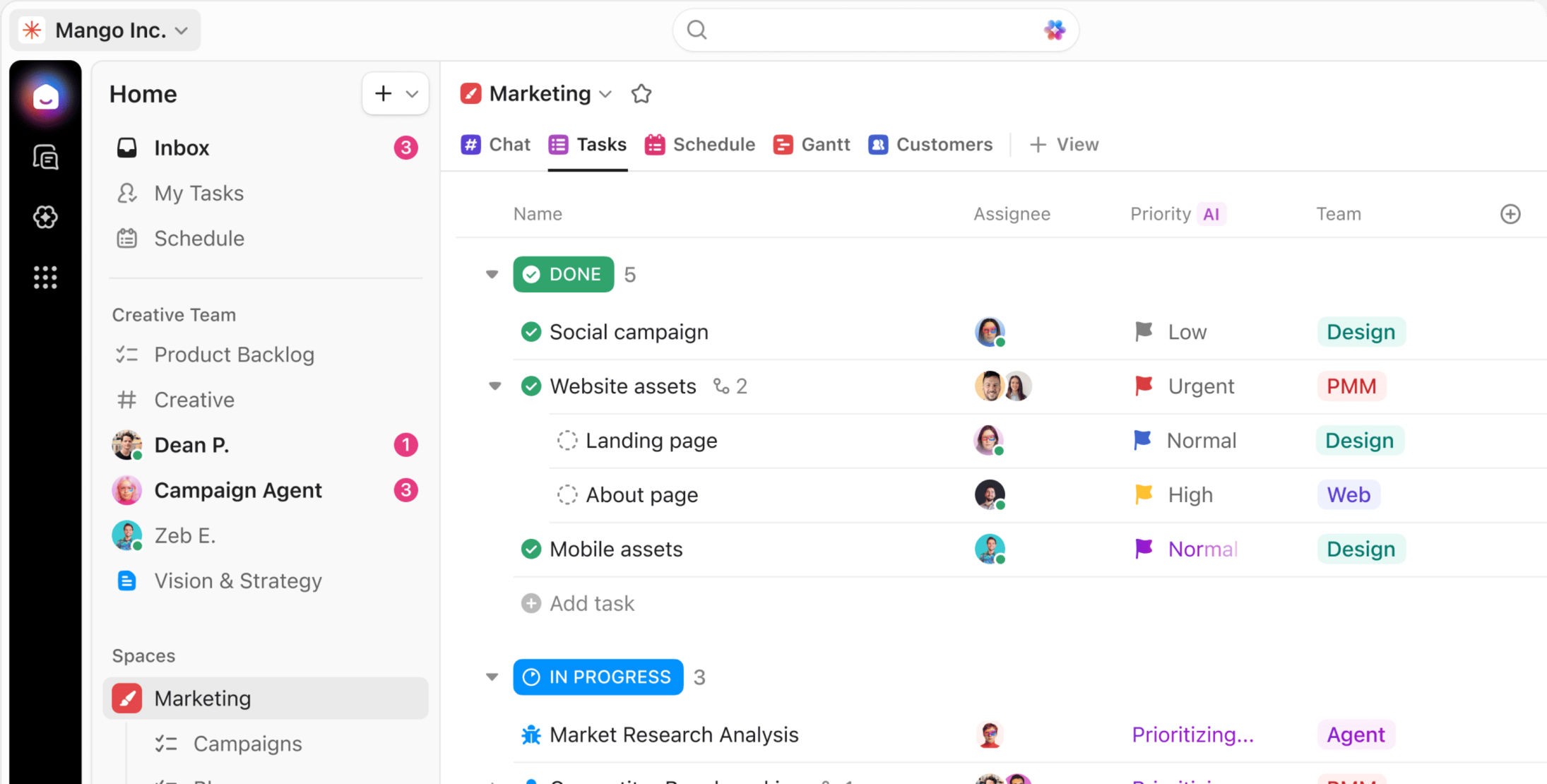
Best for: People who want to track personal goals inside the software they already use for work.
ClickUp is a work platform that replaces a stack of tools, and goals are one feature inside it. A goal holds one or more targets, each with a value to start from, a value to reach and a unit, and you can point tasks and entire lists at a target so finishing the work moves the number.
Strengths:
A ClickUp target holds where you start, where you finish and the unit
Tasks, subtasks and whole lists can feed a ClickUp target automatically
A task linked to a ClickUp goal shows a badge naming that goal
ClickUp goals are usable on the free plan, capped at 100
Limitations:
ClickUp has no habits: no repeats, no streaks, no daily check-ins
Grouping ClickUp goals into folders needs the Business plan
ClickUp charges per seat, so one person pays a team price
ClickUp does not publish how it combines several targets into one percentage
Pricing: Free Forever; Unlimited $10/user/month or $7/user/month billed yearly; Business $19/user/month or $12/user/month billed yearly
Platforms: Web, Mac, Windows, Linux, iOS, Android, Apple Watch
Rating: 4.7 on the App Store (US storefront, 9,364 ratings, August 2026)
Bottom line: If your work already lives in ClickUp, its goals hold real numbers and your tasks feed them, so there is little reason to add a second app. Look elsewhere if you want habits, or if paying a per-seat price to track your own goals sits badly.
Strides
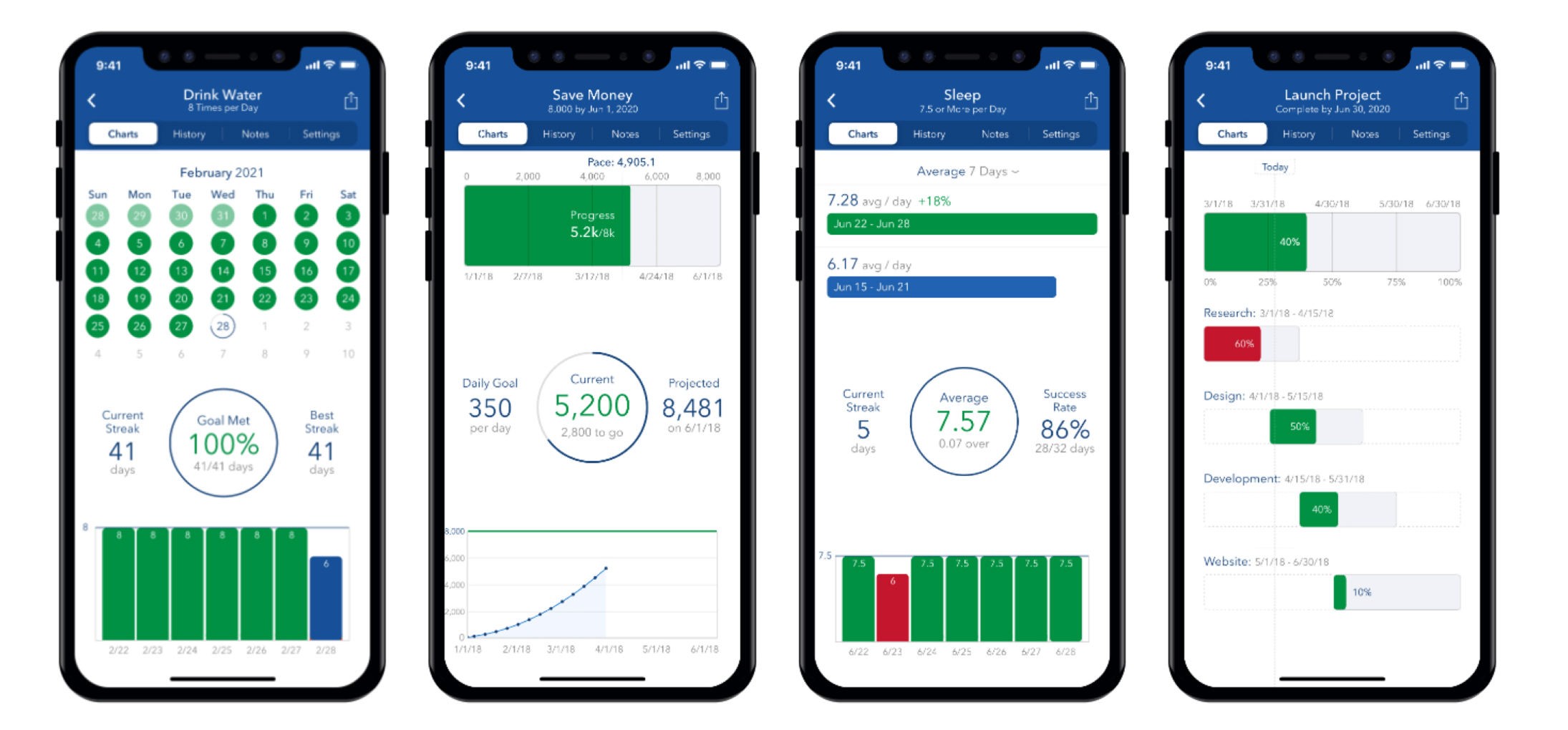
Best for: Apple users tracking numbers they log themselves, who want to know the pace they need.
Strides is a tracking dashboard for Apple devices with four different tracker types rather than one. Its Target tracker holds a value to reach and a date to reach it by, and a colour-coded pace line tells you the rate you need per day rather than breaking a streak when you miss.
Strengths:
Strides Target trackers hold a value to reach and a date
Strides recalculates the rate you need after a missed period
Strides has four tracker types rather than one binary format
Strides ships on iPhone, iPad, Mac, Watch and Vision
Limitations:
Strides has no task or habit object, so nothing can feed a goal
Strides has no way to group trackers, only tags for filtering
Strides is Apple only, with no Android and no web
The free tier stops at three trackers
Pricing: Free (3 trackers); Strides Plus $4.99/month or $39.99/year; Lifetime $79.99 one-time
Platforms: iPhone, iPad, Mac, Apple Watch
Rating: 4.8 on the App Store (US storefront, 19,106 ratings, August 2026)
Bottom line: Strides is the best app here for numbers you log yourself, and its pace line is the most useful answer to a missed week anywhere on this list. Skip it if you want tasks or habits feeding the goal, because there is nothing to attach them to.
TickTick
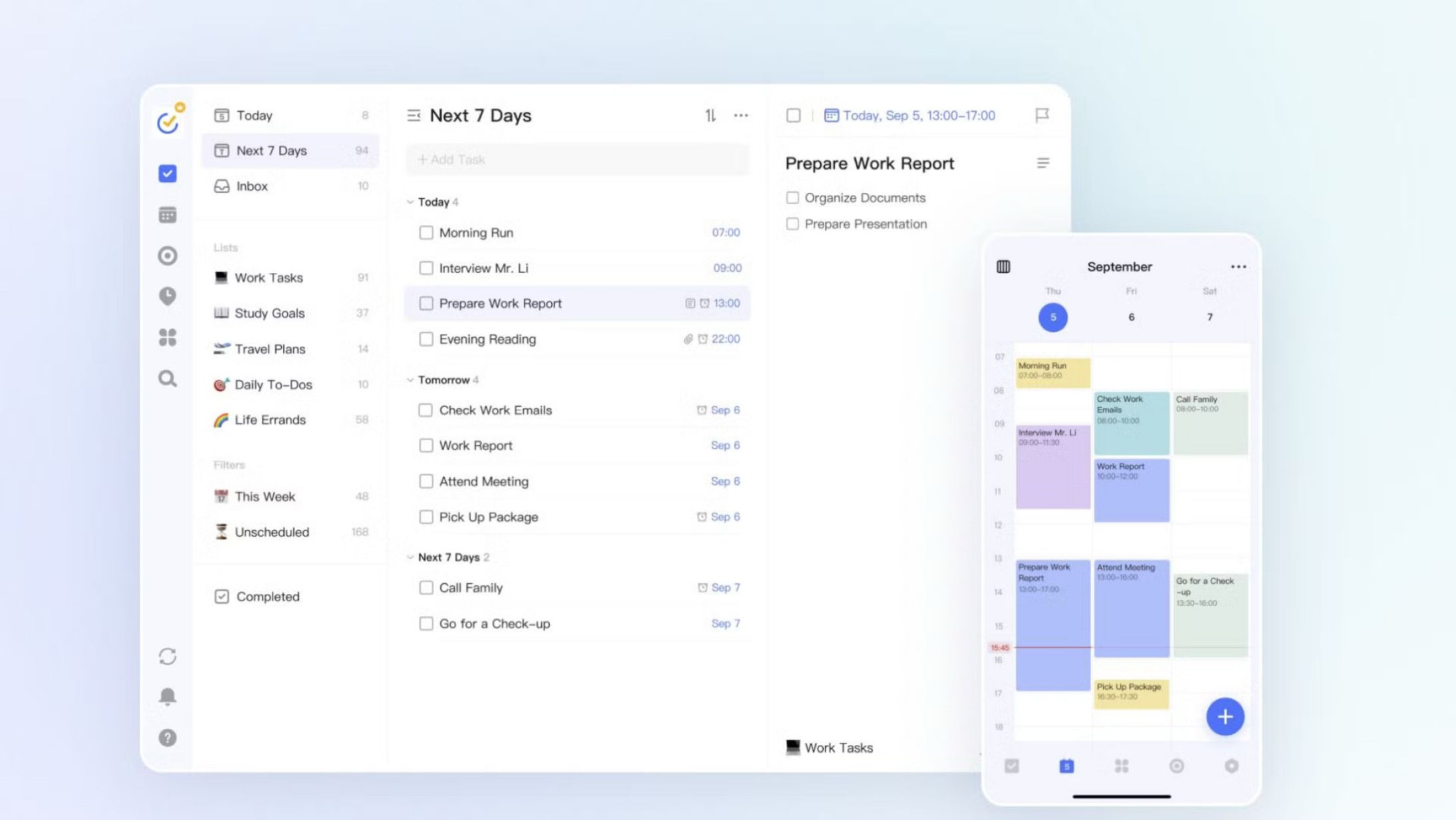
Best for: People who want tasks and habits in one app with a calendar that is actually built in.
TickTick is a task manager with a habit module attached. Its calendar is native rather than a sync from elsewhere, its task structure runs five levels deep, and habits live in a separate module you switch on.
Strengths:
TickTick's calendar is built in rather than synced from elsewhere
TickTick nests subtasks five levels deep, each a full task
TickTick has a Pomodoro timer with focus statistics
TickTick runs on more platforms than anything else here except Todoist
Limitations:
TickTick has no goal: a habit holds a daily amount and no total
Nothing in TickTick links a task to a habit or an outcome
TickTick habits cannot be dragged, so a repetition cannot be moved
TickTick's $35.99 yearly price is a limited-time offer against a $49.99 list price
Pricing: Free; Premium $49.99/year list price, currently offered at $35.99/year, or $3.99/month through the app
Platforms: iOS, Android, Web, macOS, Windows, Linux, Apple Watch
Rating: 4.9 on the App Store (US storefront, 45,000 ratings, August 2026)
Bottom line: TickTick is an excellent task manager with the best built-in calendar here, and its habit module is a real feature rather than a token one. It is the wrong pick if you want an outcome to track, because nothing in it rolls up to one.
Todoist
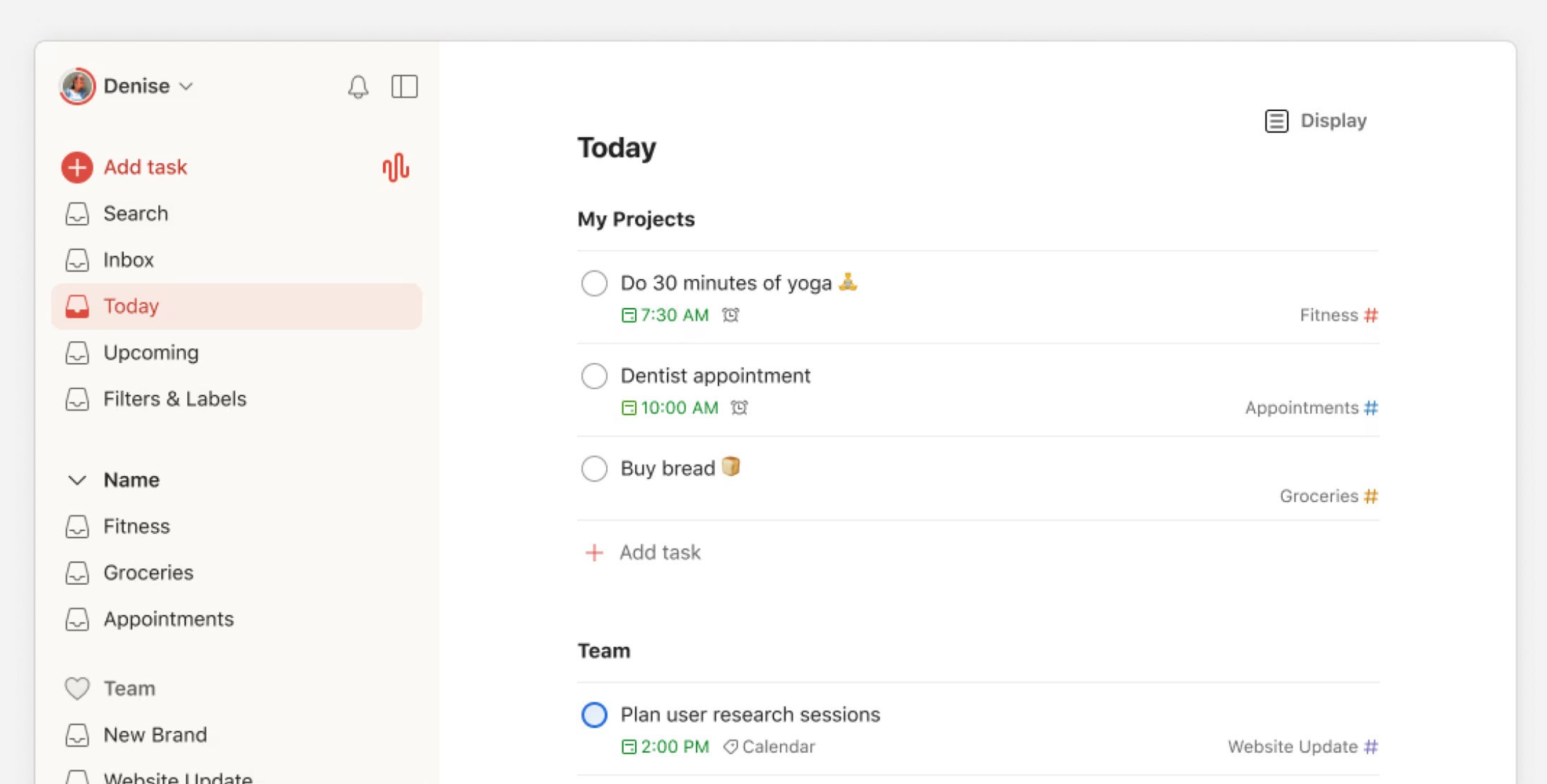
Best for: People whose real problem is that tasks never get written down at all.
Todoist is a task manager built around capture speed. Its natural-language input reads a date out of a sentence as you type it, it separates the day you plan to work on something from the day it is due, and it runs on more platforms than anything else on this list.
Strengths:
Todoist reads a date out of a sentence as you type it
Todoist separates the day you work on a task from its deadline
Todoist runs on more platforms than anything else here, from Linux to Wear OS
Todoist nests projects, sections and subtasks several levels deep
Limitations:
Todoist withdrew its goals feature in July 2026, deleting users' goals
Todoist has no start dates, so there is no baseline to measure from
Todoist's Karma counts tasks finished rather than progress made
Todoist's free plan stops at five projects and one week of history
Pricing: Free (5 personal projects); Pro $7/month or $60/year; Business $10/user/month or $96/user/year
Platforms: iOS, Android, Web, macOS, Windows, Linux, Apple Watch, Wear OS
Rating: 4.8 on the App Store (US storefront, 128,000 ratings, August 2026)
Bottom line: Todoist is the fastest way to get a thought out of your head and onto a list, across more devices than anything else here. It is not a goal tracker, it withdrew the feature that briefly made it one, and it makes no claim otherwise.
Notion

Best for: People who want to design their own system exactly and will keep it running.
Notion is a page editor with databases underneath. For goal tracking that means you can model goals, subgoals, habits and reviews however you like, with one set of data feeding many views, and a large template library so you rarely start from a blank page.
Strengths:
Notion's databases, relations and rollups are free for one person
A Notion number can show as a bar and be divided by a target
Notion rolls sums and averages from one database into another
Notion has a large template library aimed at personal goals
Limitations:
Notion has no goal: every goal is a row you design yourself
No Notion chart can show progress toward a target value
Notion charts cannot plot a rollup, the one field that aggregates work
Notion rollups cannot be nested, so work cannot climb two levels
Pricing: Free for individuals; Plus $12/member/month or $120/member/year; Business $24/member/month or $240/member/year
Platforms: iOS, Android, Web, macOS, Windows
Rating: 4.8 on the App Store (US storefront, 89,783 ratings, August 2026)
Bottom line: Notion can model any goal system you can describe, and for someone who enjoys building one that is the whole appeal. Avoid it if you want to start tracking this week, because its charts cannot measure toward a target and the upkeep is yours.
Habitica
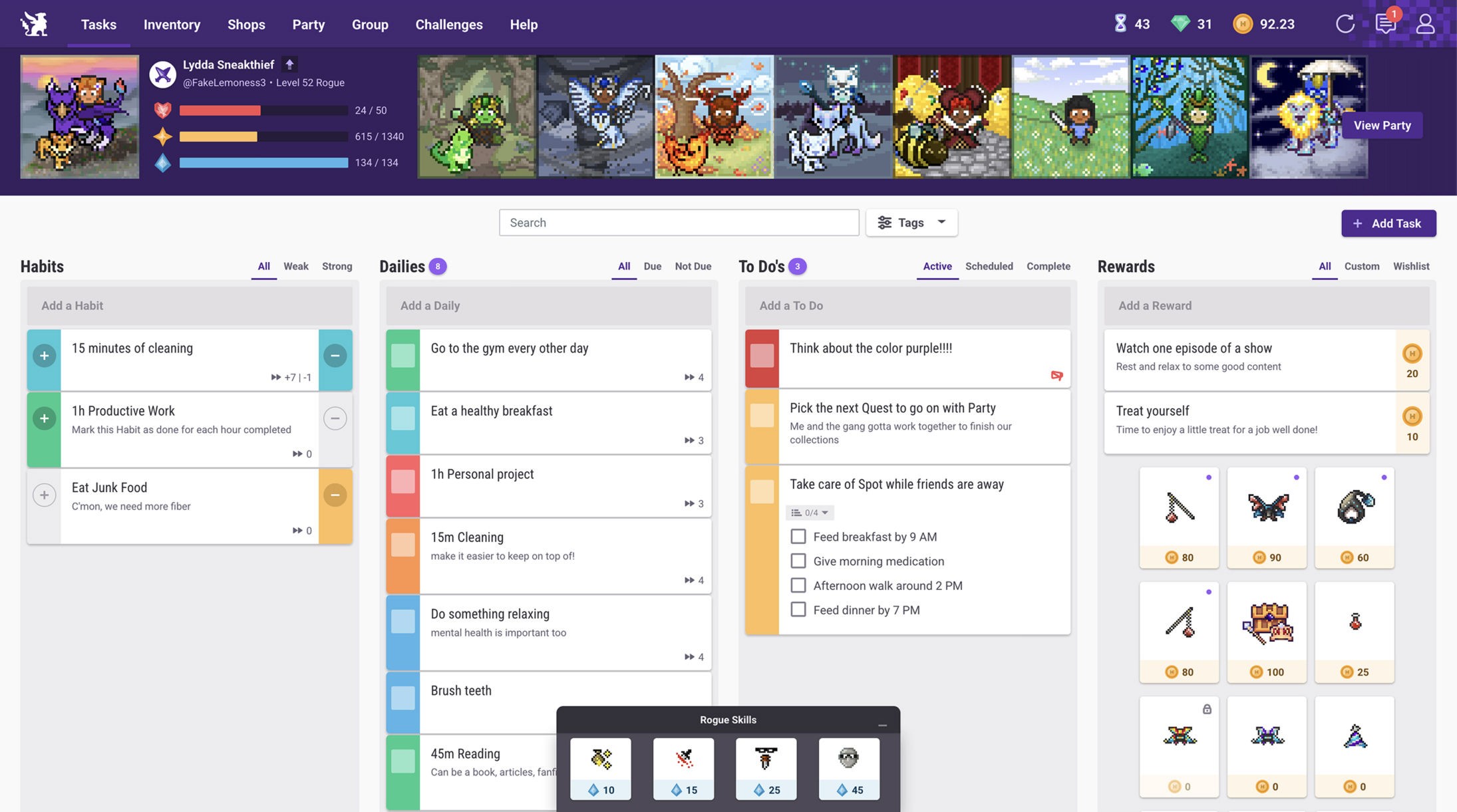
Best for: People who stop opening apps out of boredom and need the loop to be fun.
Habitica turns habits, dailies and to-dos into a retro role playing game. You earn experience, level a character, and join a party that fights bosses together, and a missed daily damages every party member.
Strengths:
Habitica's entire task system is free, with only cosmetics paid
A missed daily in Habitica damages every party member's avatar
Habitica is open source, with its full server code published
Habitica's repeat options are unusually expressive
Limitations:
Habitica has no goal object anywhere in the product
Habitica keeps no in-app progress chart, only a separate web tool and data export
Losing all health in Habitica costs a level, your gold and equipment
Pricing: Free (all core features); Premium $4.99/month or $47.99/year
Platforms: iOS, Android, Web
Rating: 4.2 on the App Store (US storefront, 3,090 ratings, August 2026)
Bottom line: Habitica is the pick when boredom is what kills your apps, and everything that matters in it is free. It has no goal object and no in-app progress chart, so pair it with something else if you need to measure an outcome.
Way of Life
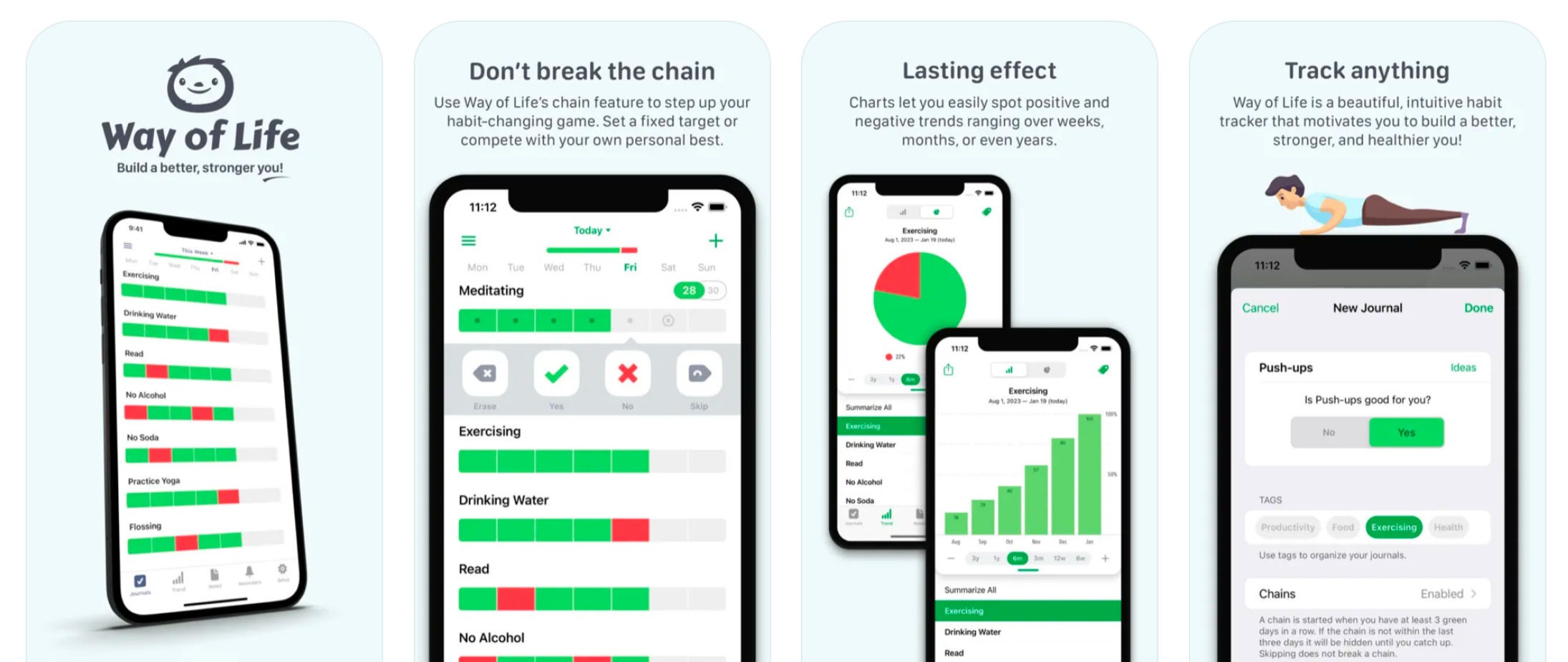
Best for: People who want the simplest possible daily yes or no, where a rest day counts.
Way of Life is a habit tracker where you mark each day Yes, No or Skip, and the Skip records a deliberate rest day so it does not count against you. Each habit keeps a journal and trend charts running over weeks, months or years.
Strengths:
Way of Life can mark a day off without it counting against you
Way of Life keeps journal notes beside long-run trend charts
Way of Life exports to CSV and backs up to your own cloud
Way of Life made themes and backup free rather than gating them
Limitations:
Way of Life has no goal and no task object at all
Way of Life's Android app is a far older, much thinner product
Way of Life has no iPad app, no web and no Windows
Way of Life's developer says sync is still being rebuilt
Pricing: Free (3 items); Premium $4.99/month, or a one-time unlock at $14.99 or $29.99
Platforms: iPhone, Mac, Apple Vision, Android
Rating: 4.8 on the App Store (US storefront, 5,200 ratings, August 2026)
Bottom line: Way of Life does one thing, asks one question a day, and lets a rest day count as a decision rather than a failure. Choose something else if you use Android or an iPad, or if you want any of it to add up to a goal.
Streaks
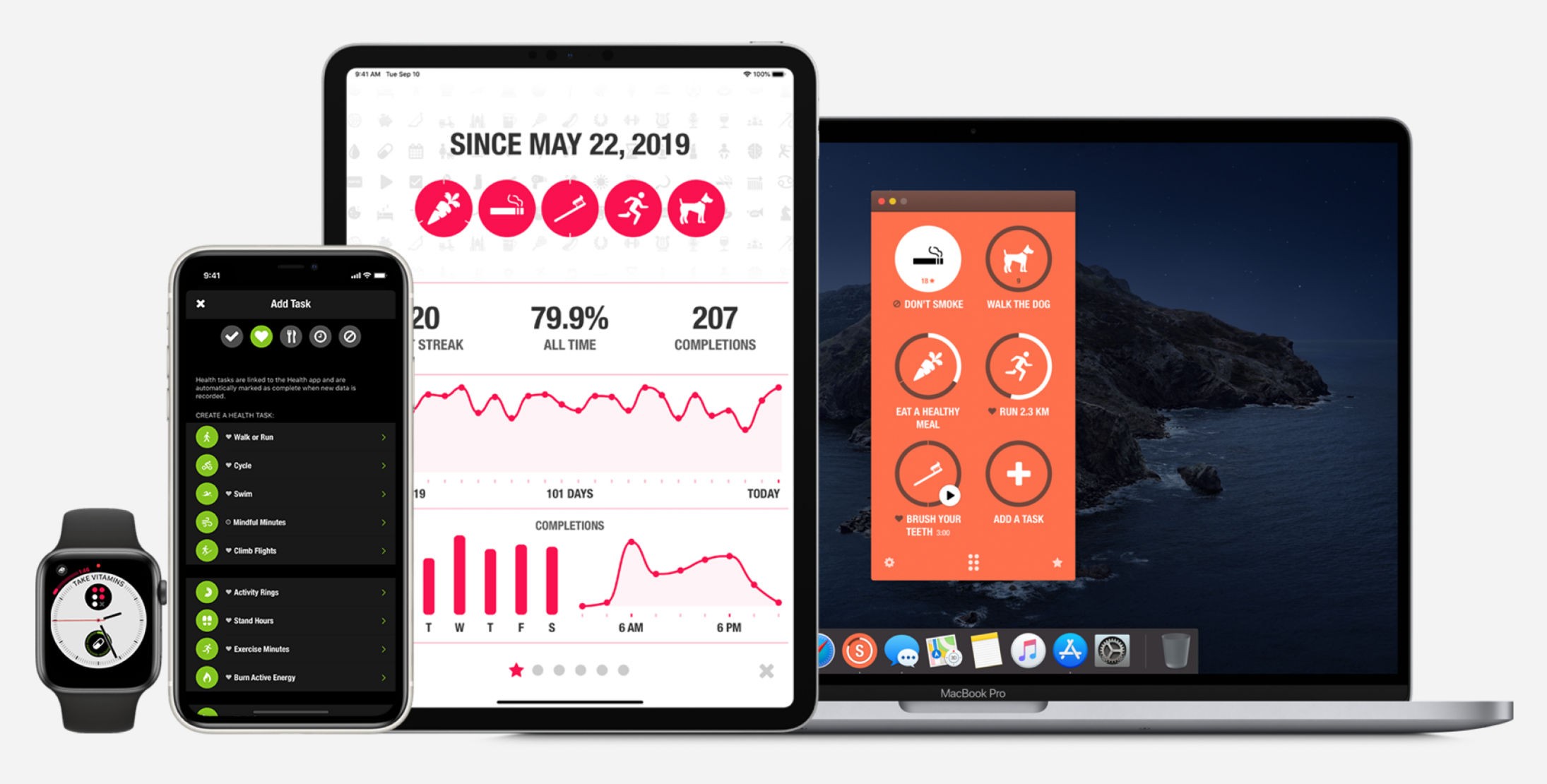
Best for: Apple users who want their habits ticked off automatically from health data, for one payment.
Streaks is an Apple-only habit tracker built around an unbroken chain of daily completions. You track up to 24 tasks across four pages of six, and a health task marks itself complete once the Health app records the number you asked for.
Strengths:
Streaks reads Apple Health and ticks a task off by itself
Streaks costs one payment of $5.99, with nothing recurring
One Streaks purchase covers iPhone, iPad, Watch, Mac and Vision Pro
Streaks forgives one missed day before a chain breaks
Limitations:
Streaks has no end date, so nothing on the list ever finishes
A Streaks goal is a daily amount, with no running total
Streaks stops at 24 tasks, and a full page rejects new ones
Streaks is Apple only, and a task title stops at 18 characters
Pricing: $5.99 one-time, with no subscription and no in-app purchases
Platforms: iPhone, iPad, Apple Watch, Mac
Rating: 4.8 on the App Store (US storefront, 27,344 ratings, August 2026)
Bottom line: Streaks is the best value here at $5.99 once, and nothing else ticks habits off from your health data as widely. It is not a goal tracker, because nothing in it carries an end date and nothing ever finishes.
Coach.me
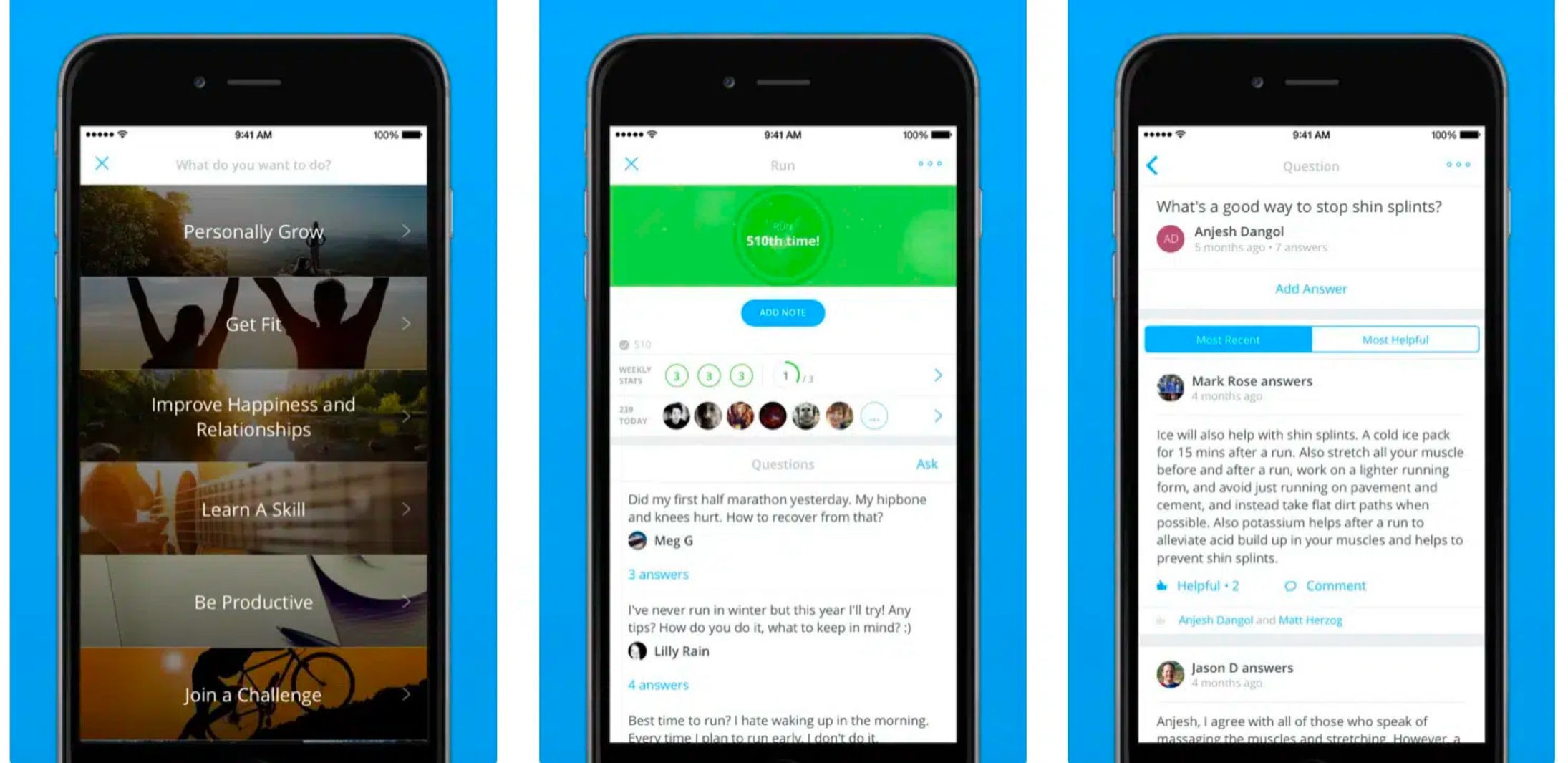
Best for: People who want a real human coach, not just another tracker.
Coach.me is a free habit tracker with a coaching marketplace attached. You track habits, set how many times a week you intend to do them, and get encouragement from a community following the same habit, and you can hire a coach through the same account.
Strengths:
Coach.me tracks unlimited habits free on iPhone, Android and web
Coach.me is the only app here that sells access to a human coach
Coach.me lets you set a weekly frequency rather than forcing daily
Coach.me shipped an update in April 2026 and lists active coaches
Limitations:
Coach.me has no goal: a habit and a goal are one object
Coach.me streaks only count consecutive days, ignoring weekly targets
Coach.me cannot rename a habit or reset one, by its own documentation
Coach.me has the weakest rating here, from the smallest sample
Pricing: Free (unlimited habit tracking); Habit Coaching $25/week or $87/month; Leadership Coaching $150/month
Platforms: iOS, Android, Web
Rating: 3.5 on the App Store (US storefront, 171 ratings, August 2026)
Bottom line: Coach.me is worth it for the coach rather than the tracker, and since the tracker is free the coach is the only thing you pay for. Look elsewhere if you want a measurable goal, because a habit and a goal are one object here.
How to choose
Start with what failed last time, because that is what the next app has to survive.
If your tasks get done but the goal never moves, pick Griply. Your tasks and habits sit under a goal you can measure, so the list you work through is the reason the number changes.
If you keep rebuilding a goal tracker in a spreadsheet or a Notion template, pick Griply. The structure is already there, so your time goes into logging progress instead of maintaining the system.
If you miss a day and your whole schedule stops making sense, pick Griply. You can move one repetition of a habit, drop it, or add an extra, without rewriting the schedule.
If you track numbers and do not want a task list at all, pick Strides. It holds the goal and tells you the pace you need, and never asks you to keep a to-do list.
If you already run your work in ClickUp, keep your goals there. The targets hold real numbers and your tasks feed them, as long as you do not need habits.
If you need it on Android today, Griply is not an option yet. TickTick is the closest thing here with tasks and habits together, and Habitica is the pick if it has to be free.
If what you want is a person rather than an app, pick Coach.me. Nothing here replaces a human, and Coach.me is the one that sells you an actual one.
Why most goals are abandoned by March
The usual explanation is motivation, and it is usually wrong. The goal and the work sit in different places, so nothing you do on a Tuesday ever reports back to the thing you decided in January.
Three gaps do the damage, and most apps on this page leave at least one of them open.
The goal has no number. If a goal is a sentence rather than a value with a date on it, there is nothing to be behind on. Being behind is the signal that makes people act, and a sentence cannot produce it. Seven of the eleven apps here store no goal at all, so their users never get that signal.
The work points nowhere. A task list records what you did and a habit chain records that you turned up. Neither tells you whether the number moved. TickTick and Todoist are both good at holding the work and have nothing for it to feed, which is why people who use them well still end a quarter unsure whether anything changed.
The goal answers to nothing. A goal sitting in a flat list beside nine others can be dropped without cost, because nothing above it notices. This is the gap most goal apps do not try to close at all, and it is the reason a life area with a written vision above the goal changes what happens in a bad week.
Griply closes all three, which is the argument this page makes and the reason we built it. ClickUp closes them too and asks a per-seat price for the third. GoalsOnTrack closes all three and has not updated its mobile app since 2022. Those are the real trade-offs. The other eight leave at least one gap wide open, which is fine as long as you know which one.
This page is for people who already know what they want and need an app that holds them to it. Griply is the one on this list where the habit you do today connects to the goal you set in January.
Start for free
Still deciding? Join our community and ask the founders why we built Griply. We're there every day.
What is the best app to track your personal goals?
Griply is the best app for personal goals your daily work feeds into: a goal holds a starting point, a target and a deadline, and your tasks and habits sit under it. For tracking numbers on Apple devices without a task list, Strides is the stronger pick.
Can you track goals in Todoist or TickTick?
No. Neither stores a goal you can measure. Todoist withdrew its goals feature in July 2026 and has no start dates at all. TickTick habits hold an amount per day rather than a total to reach. Both track what you did rather than what moved.
What is the best goal tracking app that also tracks habits?
Griply. Goals carry a start value, a target and a deadline, a roadmap lays them out over time, and your habits and tasks link straight to them. GoalsOnTrack has habits, but doing one never moves the goal. See best apps for tracking goals and habits.
What is the best free goal tracking app?
Griply's free plan is the only one here that ties habits and tasks to a goal with a target and a deadline, capped at two goals and two habits. Habitica's free plan gives away far more features and has no goal at all. See the best free goal tracker apps.
Is GoalsOnTrack free?
No. GoalsOnTrack has no free tier. Its own wording is "We do require payment upon signing up. However, we offer 30-day unconditional money back guarantee." That 30-day window is a refund guarantee rather than a free trial. Pricing starts at $68/year.
Does Google have a goal tracker?
No. Google Tasks holds to-dos and Google Calendar holds events, and neither stores a goal with a start value, a target and a deadline. A task with a date is not a goal. See does Google have a goal tracker.
Can I track goals in a spreadsheet or Notion instead?
Yes, and many people do until the upkeep outweighs the tracking. A spreadsheet or a Notion database will hold a start value and a target. Neither charts progress against a deadline without work you do yourself, and Notion's charts cannot measure toward a target at all.
How do I choose a goal tracking app?
Start from what failed last time. If your goals were never measurable, look for a start value, a target and a deadline. If a goal was measurable and still never moved, look for a task or habit that attaches to it. Everything after that is preference.
Which goal tracking apps show progress charts?
Griply charts your logged value against a target line running to your deadline, and Strides charts the same with a pace line for the rate you need. GoalsOnTrack shows a percentage. Habitica has no view of your data over time, by its own account.
Is there a goal tracking app without a subscription?
Yes. Streaks costs $5.99 once, with no subscription and no in-app purchases, which makes it the cheapest way onto this list. Griply sells a lifetime licence at $119.99. Strides and Way of Life both offer one-time options, priced on the App Store.
