

Table of Contents
The best habit tracker apps in 2026 are Griply, Habitify, TickTick, Strides, Productive, Habitica, Streaks, Way of Life, HabitKit, Everyday, HabitNow, Loop Habit Tracker, and Finch. We ranked them first on the thing most roundups skip: whether each app connects a daily habit to a goal it moves. Then on three basics: how flexibly you can schedule a habit, what you see beyond a streak, and which devices it runs on. You start a habit in January, the streak looks great for three weeks, and by February the app is just another red X you avoid opening. Most habit trackers only count streaks: they show whether you turned up, without ever telling you whether the habit is moving the goal it was meant to serve. This page is for anyone who wants a habit to mean something, to see a daily action feed a result they actually care about. That is where Griply starts, and it is why Griply leads the list, even though every other app here earns its spot.
We make Griply, so it is one of the thirteen apps here and it was held to the same criteria as the rest. Every app is scored on what its own documentation and our hands-on testing show, each one is the best choice for a particular kind of user, and you should pick the app that fits how you work.
The best habit tracker apps at a glance
Griply: the only app here where every habit links to a measurable goal it feeds; iOS, web, Mac and Windows; free plan (2 goals, 2 habits), Premium $4.99/month or $29.99/year.
Habitify: clean cross-device tracking with a measurable target on each habit; iOS, Android, web, Mac, Apple Watch; free plan (3 habits), Premium from $8.99/month or $49.99/year.
TickTick: a full task manager with a real habit module built in; iOS, Android, web, Mac, Windows, Linux; free plan (up to 5 habits), Premium $3.99/month or $35.99/year.
Strides: SMART goal and habit tracking with a target-by-date pace line; iOS only; free plan (3 trackers), Plus from $4.99/month.
Productive: a polished, dedicated habit tracker with granular scheduling; iOS, Android; free plan (limited habits), Premium from $10.99/month or $19.99/year.
Habitica: turns habits into a role-playing game with group accountability; iOS, Android, web; free to use, optional subscription $4.99/month or $47.99/year.
Streaks: a simple, one-time-purchase habit tracker for Apple devices; iOS, Mac, Apple Watch; $5.99 one-time, no subscription.
Way of Life: color-coded Yes/No/Skip logging with long-run trend charts; iOS, Mac, Android; free tier (capped), Premium from $4.99.
HabitKit: a GitHub-style grid tracker that turns consistency into a wall of color; iOS, Android, Mac; free tier (limited habits), Pro from $1.99/month.
Everyday: a "don't break the chain" tracker synced across web, mobile and desktop; iOS, iPad, Mac, Apple Watch, Android, web; free tier (limited habits), Premium $7.49/month or $29.99/year.
HabitNow: an all-in-one Android habit, task and routine planner; Android only; free version, one-time premium unlock (no subscription).
Loop Habit Tracker: a free, open-source, offline habit tracker for Android; Android only; completely free, no ads.
Finch: a self-care app that grows a virtual pet as you build habits; iOS, Android; free to use, Finch Plus $9.99/month or $69.99/year.
Comparison
App | Links habits to goals | Scheduling | Progress view | Platforms | Best for |
|---|---|---|---|---|---|
Griply | Yes, feeds a measurable goal | Any frequency, per-day targets | Goal charts plus habit stats (rate, perfect weeks) | iOS, web, Mac, Windows | Habits that move a goal you can measure |
Habitify | A target on the habit itself | Daily, weekly, custom, time-of-day slots | Charts, completion calendar, mood notes | iOS, Android, web, Mac, Watch | Tracking habits across every device |
TickTick | No, habits and tasks sit apart | Weekdays, times per week, daily amounts | Streaks plus per-habit stats | iOS, Android, web, Mac, Windows, Linux | Habits inside a full task manager |
Strides | Separate, unlinked trackers | Specific days, custom intervals | Charts, success rates, pace line | iOS only | SMART goals with a pace line, on Apple |
Productive | No, habits stand alone | Days plus morning/noon/evening, multiple daily | Per-habit stats, week-by-week trends | iOS, Android | A clean, dedicated habit tracker |
Habitica | No, nothing holds a target or deadline | Daily, weekly, monthly, repeat every X | Game stats; charts only via a web tool | iOS, Android, web | Gamified accountability with friends |
Streaks | No | Daily chain, chosen days | Streaks plus a basic stats view | iOS, Mac, Watch | A simple one-time-purchase Apple app |
Way of Life | No | Daily only, with reminders | Trend charts over months and years, notes | iOS, Mac, Android | Spotting long-run trends at a glance |
HabitKit | No | Chosen days, frequency, multiple daily | GitHub-style tile grid, calendar, yearly review | iOS, Android, Mac | A visual wall of your consistency |
Everyday | No | Daily-first, with a skip option | Chain board, current vs longest streak, rates | iOS, iPad, Mac, Watch, Android, web | The same chain on every device |
HabitNow | No, streaks only | Days, times per period, multiple daily | Calendar, stats, home-screen widgets | Android only | An all-in-one Android planner |
Loop Habit Tracker | No | Times per week, every other day | A "habit strength" score plus graphs | Android only | A free, open-source Android tracker |
Finch | No, the pet grows instead | Chosen days, multiple daily | Mood and self-care insights | iOS, Android | Habits alongside mental-health self-care |
What makes a good habit tracker app
Most habit trackers only count streaks: they record whether you showed up, without showing whether the habit is moving the goal it was meant to serve. Four things separate the trackers that last from the ones you stop opening.
Does it link a habit to a goal? Without that link, a habit is a chain you protect for its own sake, so when the chain breaks there is nothing underneath it to keep going for. This is the one criterion the field splits hardest on, and we scored it from what each app can actually store: Griply is the only app here where a habit attaches to a measurable goal it feeds. Habitify and Strides come closest: Habitify puts a target on the habit itself, and Strides offers a separate target-by-date tracker, but neither ties a daily habit to the outcome it serves. The rest, including strong apps like Habitica and Loop, track habits in isolation by design.
How flexibly can you schedule? A habit you can only set to "every day" breaks the first week real life gets in the way, so we checked each app's frequency options. Most clear this bar: Griply, Habitica, HabitNow, HabitKit, Productive and TickTick all handle specific days, custom intervals and multiple check-ins a day. Streaks, Way of Life and Everyday are the most limited here, built around a fixed daily chain.
What does it show you beyond the streak? A streak tells you that you turned up; it does not tell you whether it is working. We looked at what each app charts. Loop's "habit strength" score, Way of Life's multi-year trend graphs and HabitKit's tile grid are standouts, Griply pairs habit statistics with the goal's own progress chart, and Habitica is the weakest here: it keeps no in-app chart, only a separate web export.
Where does it run? The best tracker is the one on the device you actually reach for, so platform reach is a real tiebreaker, and it is where Griply gives ground. TickTick and Habitify run almost everywhere; Loop and HabitNow are Android-only; Streaks, Strides and Way of Life lean Apple; and Griply covers iOS, web and desktop but has no Android app yet.
How we tested and chose these apps
We started from the habit-tracker roundups that rank for this category in 2026, kept the apps they most often name, then added the goal-first option those lists leave out. We installed and used all thirteen ourselves: in each app we created a real daily habit, set its schedule, logged it over several days, and looked at whether the habit could connect to a larger goal and what the app showed us as progress. Every price, platform and rating was read from the vendor's own page, Google Play or the US App Store on 17 and 18 August 2026, and where an app cannot do something, we say so rather than guessing.
The best habit tracker apps in 2026
Griply
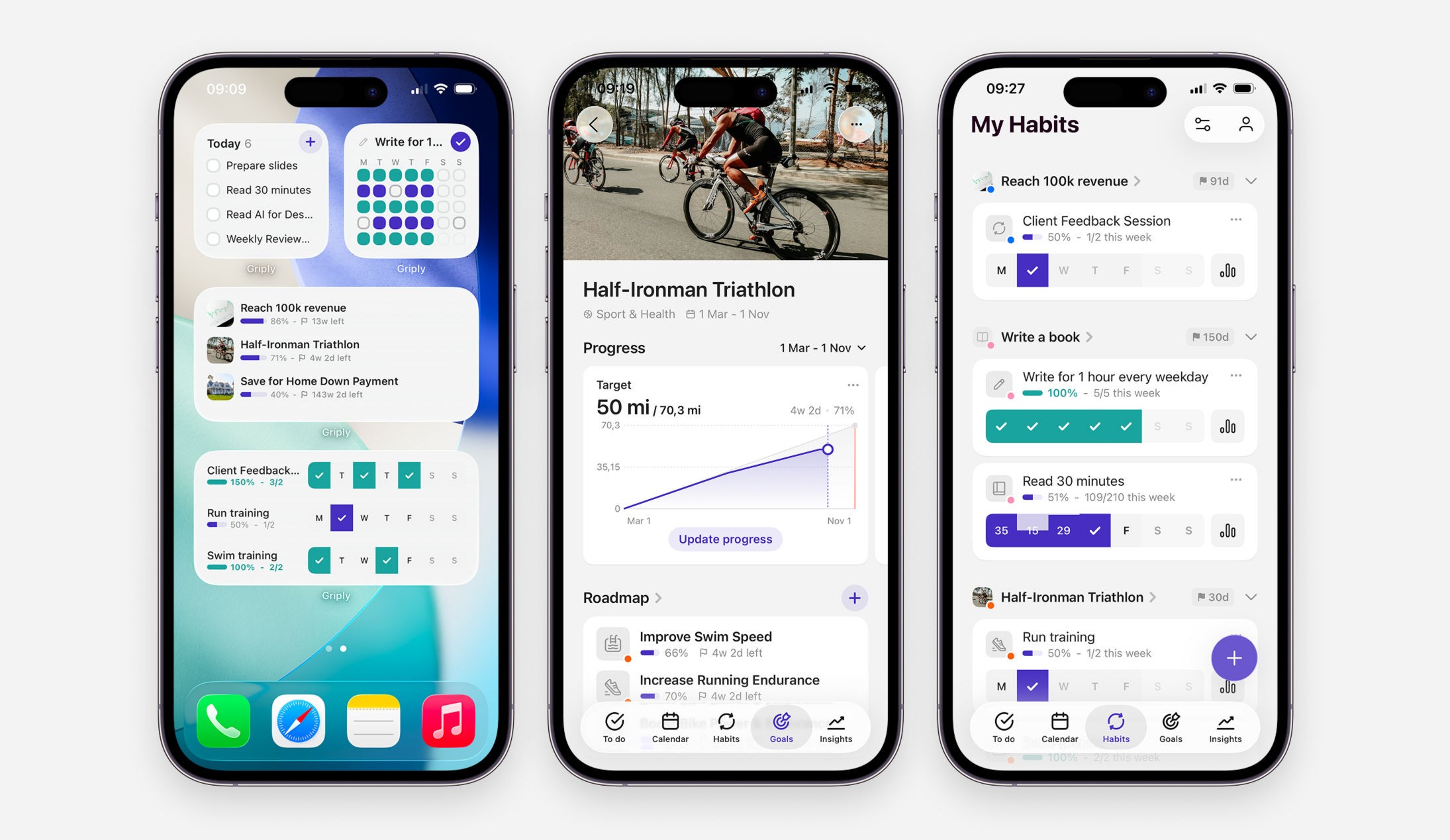
Best for: Measurable goals that your daily habits actually feed.
Griply is a goal-first planner where habits live inside a single structure (Life Area → Vision → Goal → Subgoal → Task/Habit), so every habit is attached to the goal it is meant to move. A habit in Griply carries a schedule, reminders and a reason for existing, and its completions show up in the goal's own progress view. It is built for people who want their daily reps to add up to something they can measure, instead of a chain to protect.
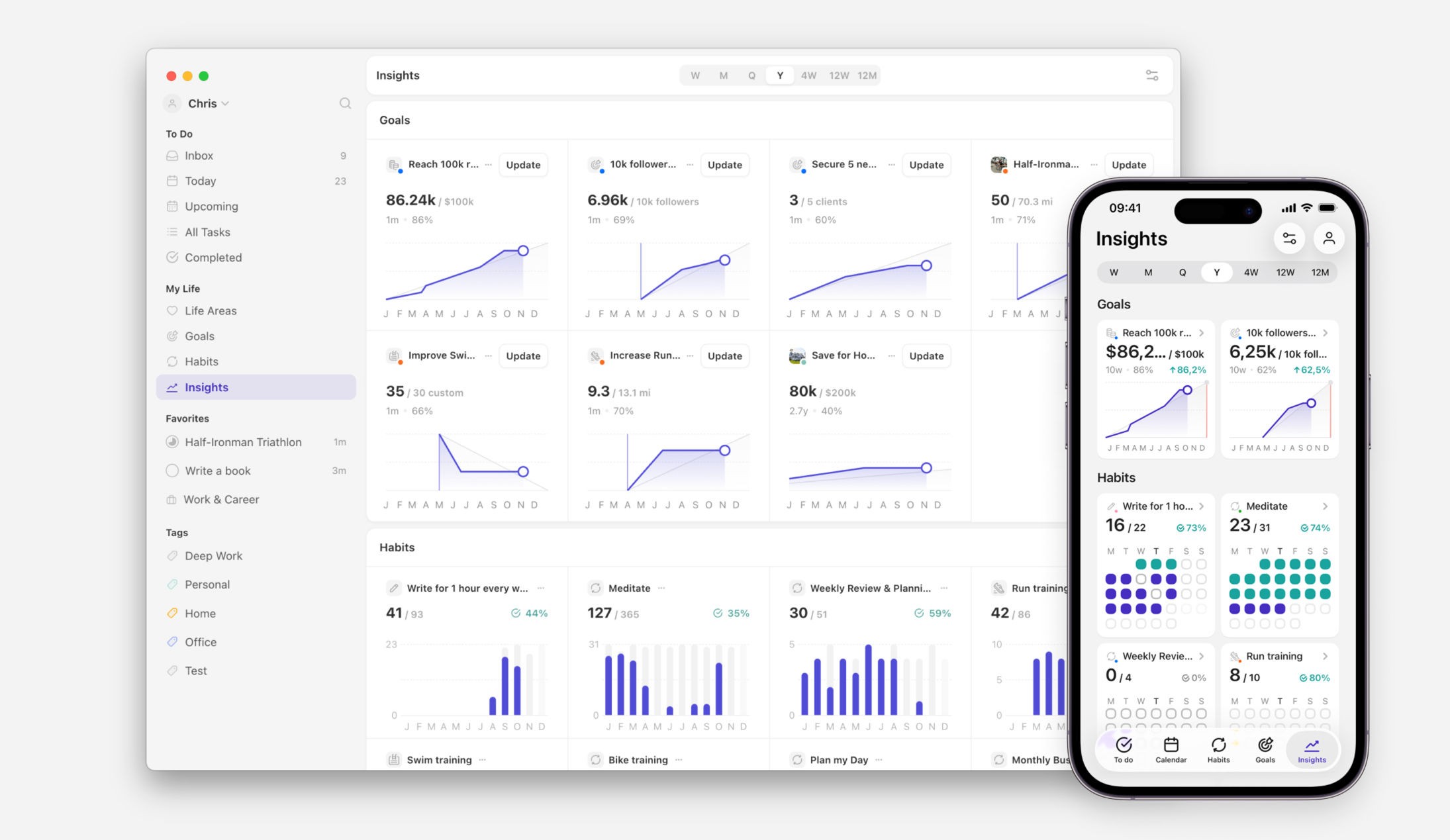
Strengths:
Every habit links directly to a goal or subgoal, and the goal has a start value, a target and a deadline you can chart.
Flexible scheduling: any frequency, specific days, per-day targets, and one-off overrides for a single day without breaking the schedule.
Goal progress charts and habit statistics, including completion rate, skips and perfect weeks, are on the free plan.
Limitations:
No Android app yet, so Android users are on the waitlist for now.
Habit targets and unlimited habits are premium, and the goal-first structure is more than someone who only wants a bare streak needs.
Pricing: Free (2 goals, 2 habits, unlimited tasks); Premium $4.99/month or $29.99/year
Platforms: iOS, web, Mac, Windows
Rating: 4.6 on the App Store (US storefront, 192 ratings, August 2026)
Bottom line: Pick Griply if you want each habit to feed a goal you can measure and watch move. If you are on Android today, or you only want a single streak with no goal behind it, one of the apps below will fit better.
Habitify
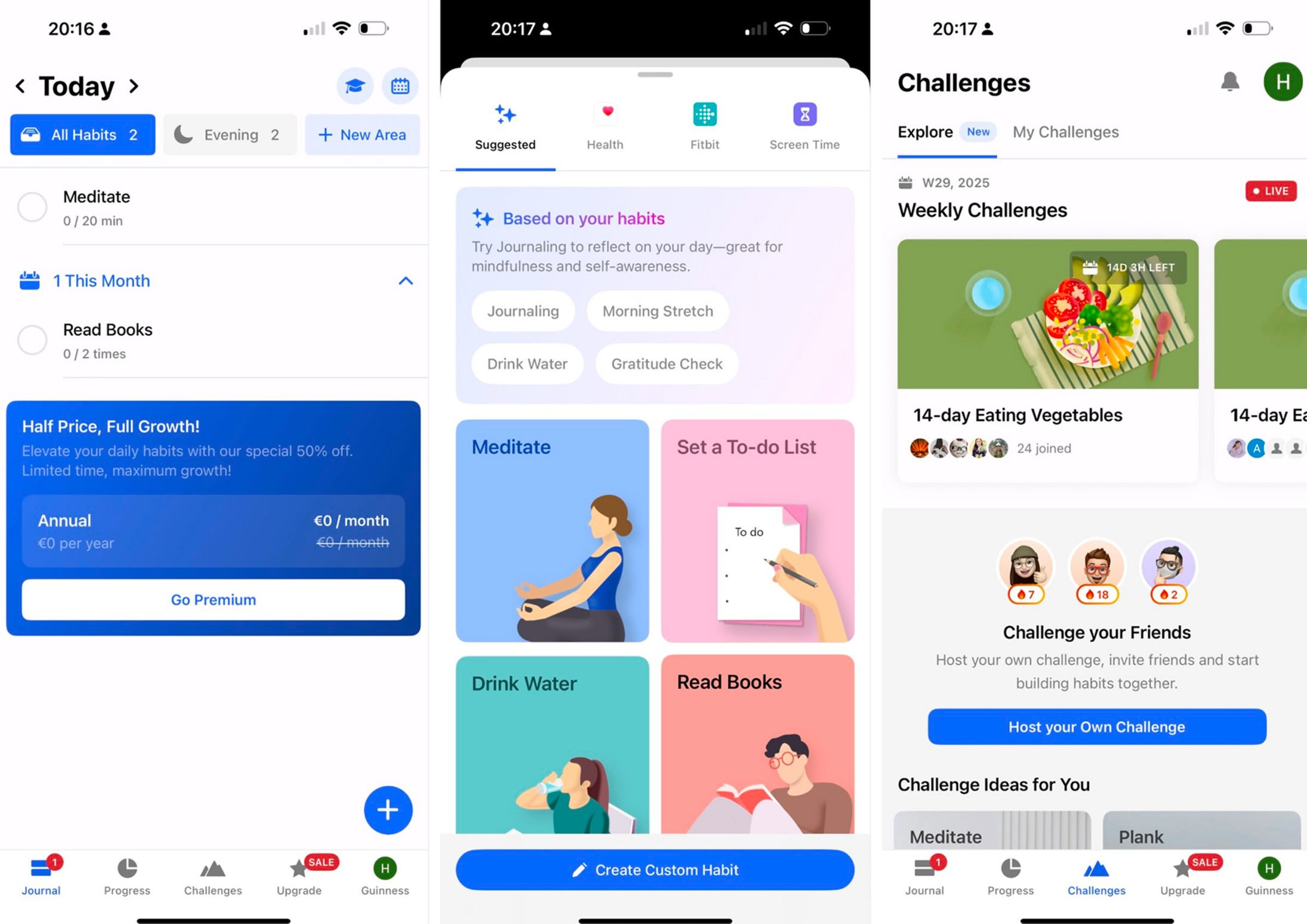
Best for: Tracking habits cleanly across every device.
Habitify is a minimalist cross-platform habit tracker that organizes your habits into morning, afternoon and evening slots and syncs them everywhere. You can give a habit a measurable target, such as reading 50 books or running 100 km, and it charts your completion history and streaks against it. It is the app to beat if you switch between an iPhone, a laptop and the web.
Strengths:
Genuinely broad sync: iOS, Android, web, Mac and Apple Watch stay in step.
A measurable target sits on each habit, so progress is more than a streak.
Rich analytics: charts, a completion calendar, and notes with a mood log.
Limitations:
The free plan stops at three habits with one reminder each.
The target lives on the habit itself, with no separate goal for it to serve, so nothing rolls a set of habits up to an outcome.
Pricing: Free (3 habits); Premium from $8.99/month or $49.99/year
Platforms: iOS, Android, web, Mac, Apple Watch
Rating: 4.6 on the App Store (US storefront, about 7,100 ratings, August 2026)
Bottom line: Pick Habitify if you want clean, good-looking habit tracking that follows you across devices. If you need your habits to ladder up to a defined goal, it stops one step short.
TickTick
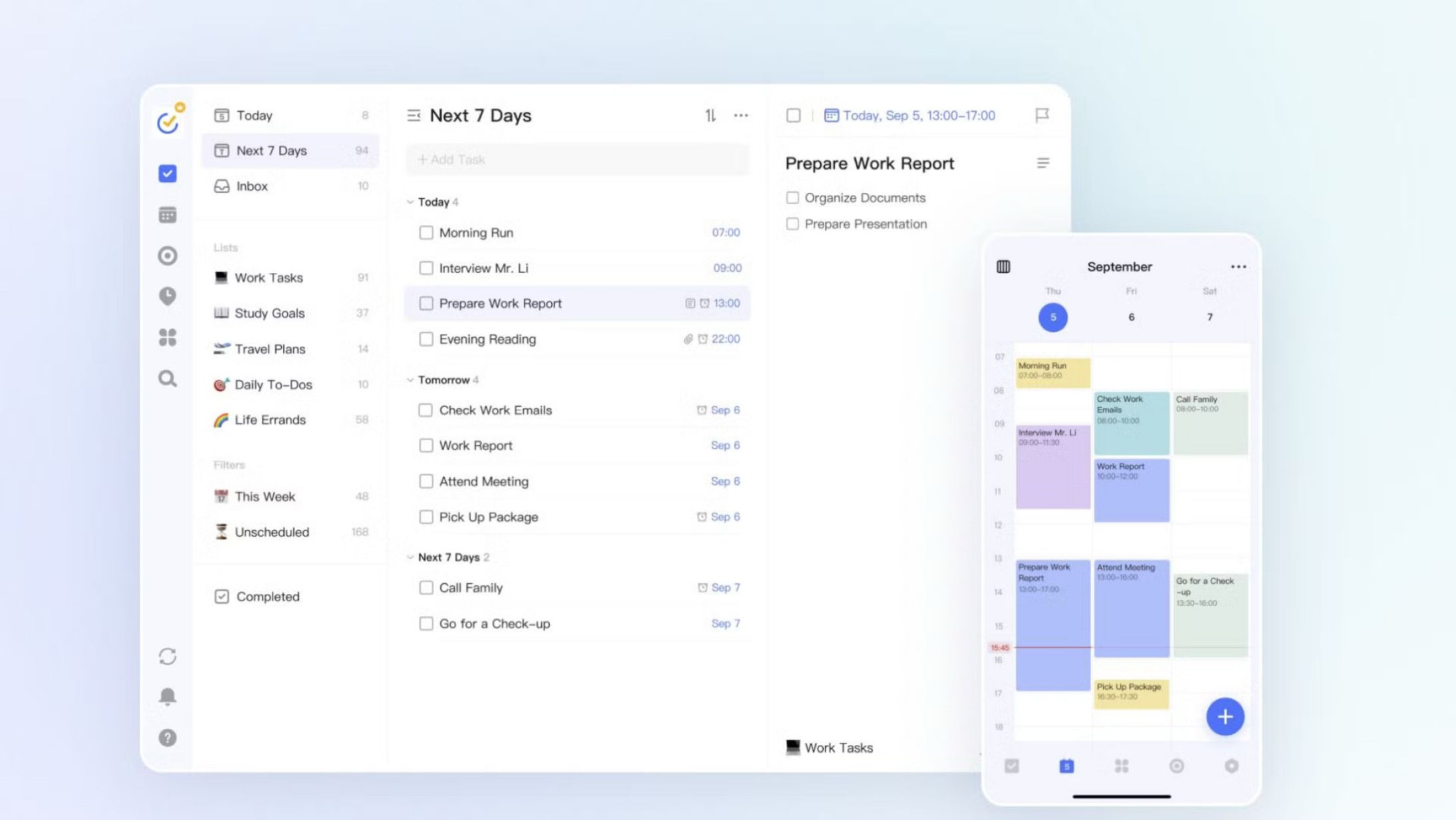
Best for: Habits kept inside a full task manager.
TickTick is a to-do list and calendar app with a real habit module built in, so your tasks, your schedule and your habits share one app. The habit tracker handles per-habit frequencies, daily amounts and up to ten reminders each, and it sits alongside a genuinely strong task manager with a built-in calendar and Pomodoro timer. It suits people who want habits next to their tasks rather than in a separate app.
Strengths:
One of the widest platform spreads here: iOS, Android, web, Mac, Windows, Linux and a browser extension.
The habit module is genuinely capable: weekday or times-per-week frequencies, measurable daily amounts, and ten reminders per habit.
Habits live beside a capable task manager, calendar and focus timer.
Limitations:
Habits and tasks sit in separate silos, and neither links to a measurable goal.
The free plan caps you at five habits.
Pricing: Free (up to 5 habits); Premium $3.99/month or $35.99/year (the yearly price is a limited-time offer against a $49.99 list price)
Platforms: iOS, Android, web, Mac, Windows, Linux
Rating: 4.9 on the App Store (US storefront, 45,000 ratings, August 2026)
Bottom line: Pick TickTick if you want a strong task manager and are happy for habit tracking to be one feature inside it. If the habit is the point and you want it tied to a goal, it is not built for that.
Strides
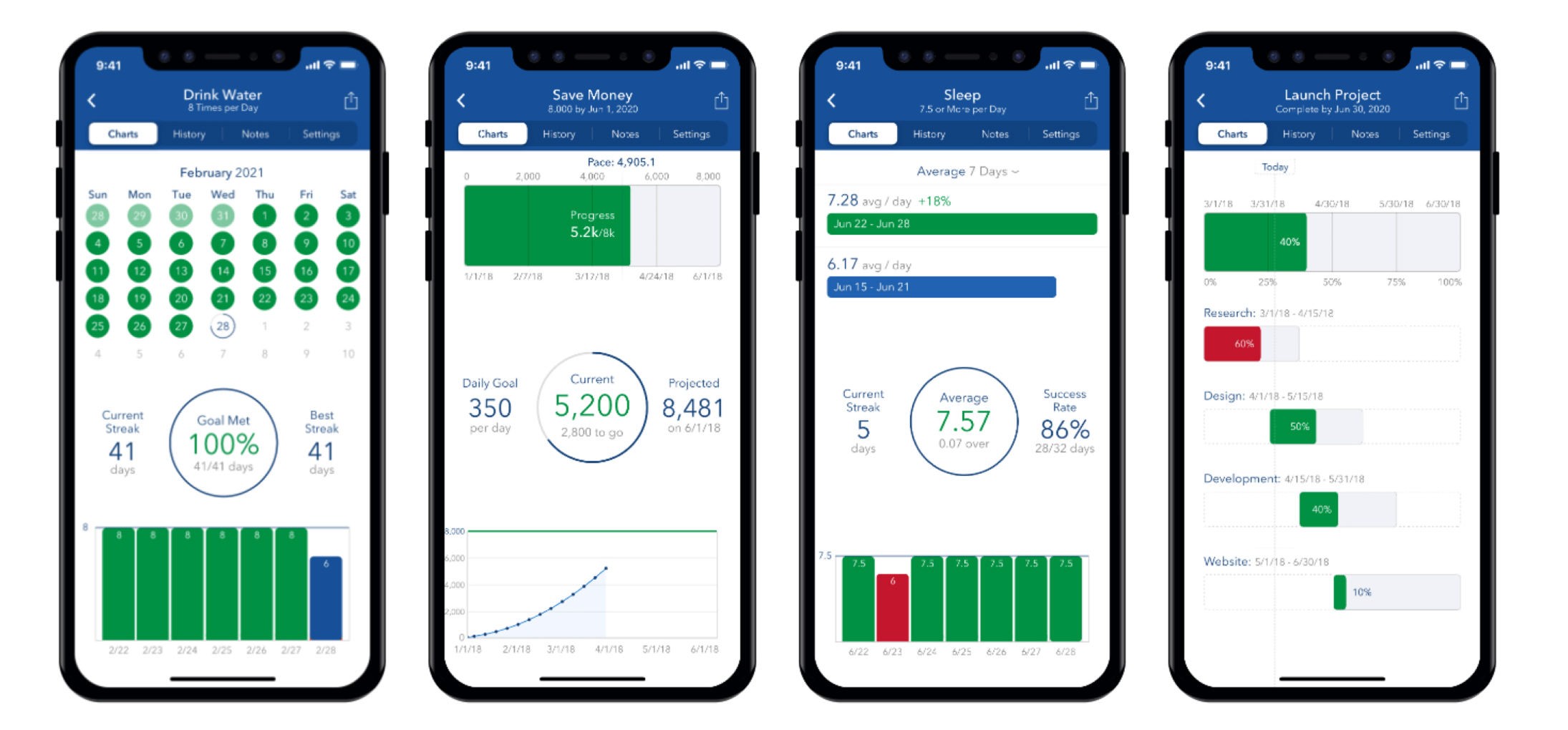
Best for: SMART goals with a pace line, on Apple devices.
Strides is a goal and habit tracker built around SMART goal setting, with four tracker types: Habit, Target, Average and Project. A Habit is a yes/no daily streak, while a Target tracks a value toward a number by a date and draws a pace line so you can see if you are ahead or behind. It is a strong fit for anyone who thinks in measurable targets and lives in the Apple ecosystem.
Strengths:
Four tracker types cover far more than a simple streak, including value-by-date goals with a pace line.
Strong analytics: charts, success rates and progress reports, plus 150-plus templates.
Unlimited reminders and Apple Health integration.
Limitations:
Apple-only in practice: no Android and no web, with an Android version still on a waitlist.
Habits and measurable targets are separate tracker types with no link between them.
Pricing: Free (3 trackers); Plus from $4.99/month
Platforms: iOS
Rating: 4.8 on the App Store (US storefront, about 19,000 ratings, August 2026)
Bottom line: Pick Strides if you want SMART, measurable targets with a pace line and you are all-in on Apple. If you need Android, web, or a real link between a habit and the goal it serves, look elsewhere.
Productive
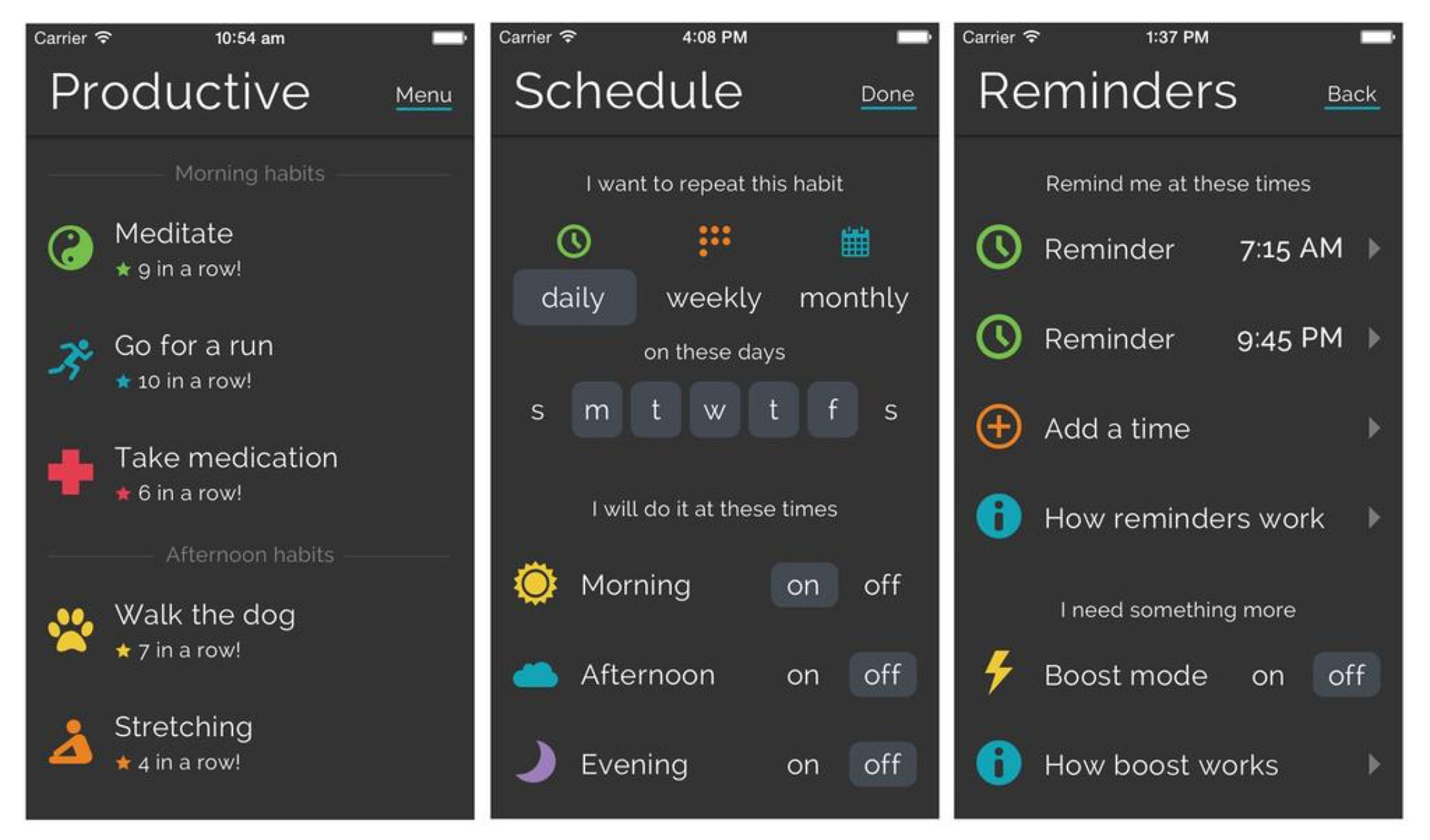
Best for: A clean, dedicated habit tracker done well.
Productive is a polished habit tracker built purely around scheduling daily habits, building chains and reviewing stats. You choose which days and which time of day each habit is due (morning, afternoon or evening), and can set several check-ins a day, then watch per-habit trends build week by week. It is a focused option for people who want habit tracking with nothing extra to set up around it.
Strengths:
Granular scheduling: specific weekdays, time-of-day slots, and multiple completions a day.
Real analytics: per-habit stats and week-by-week trend data, more than just a streak.
Runs across the Apple ecosystem and Android.
Limitations:
The free tier caps how many habits you can track; unlimited habits are premium.
Habits are tracked in isolation, with no link to a separate measurable goal.
Pricing: Free (limited habits); Premium from $10.99/month or $19.99/year
Platforms: iOS, Android
Rating: 4.6 on the App Store (US storefront, about 91,000 ratings, August 2026)
Bottom line: Pick Productive if you want a clean, capable habit tracker with good scheduling and stats. If you want your habits connected to a goal, it keeps them standalone.
Habitica
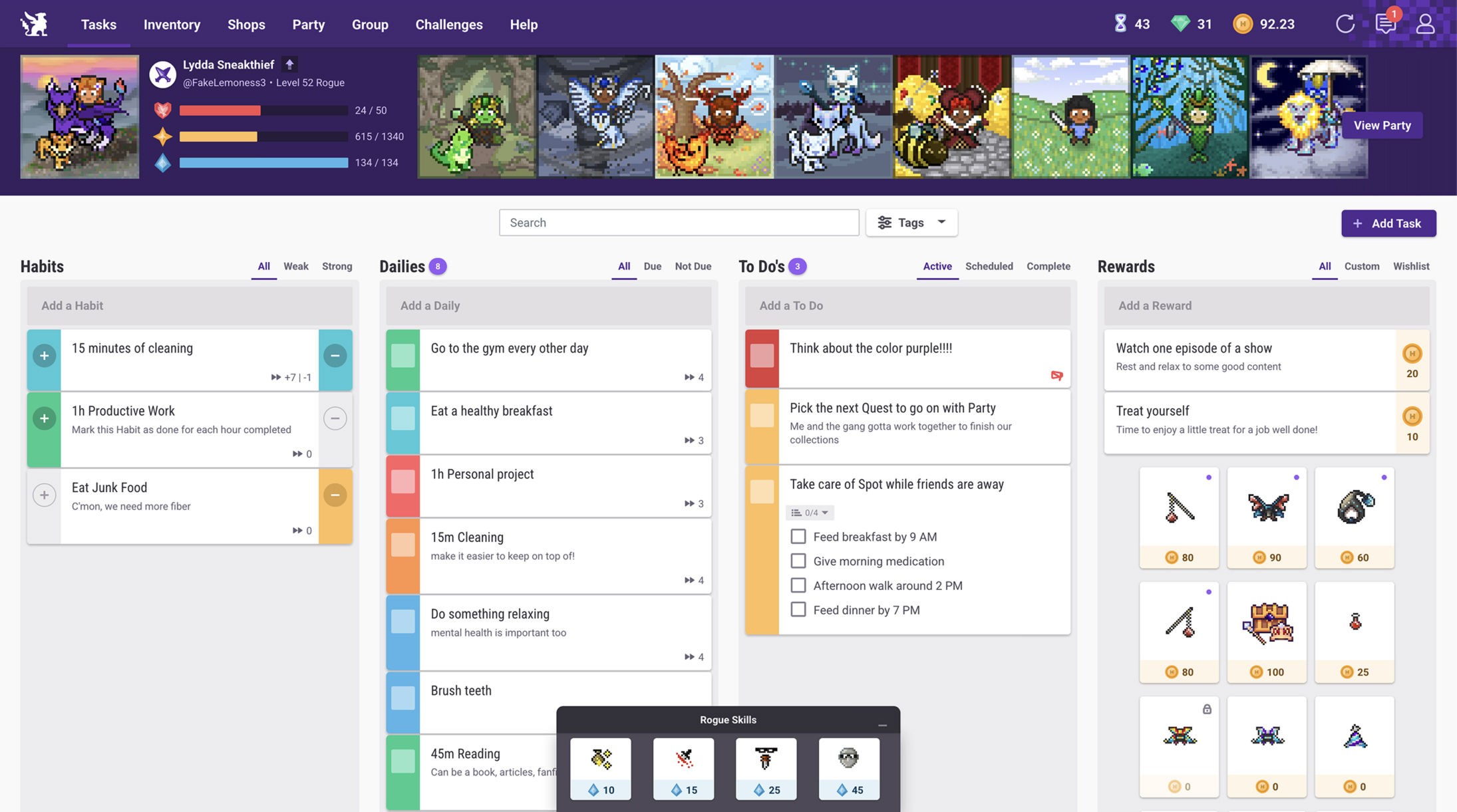
Best for: Gamified accountability with friends.
Habitica turns your habits into a retro role-playing game: you complete Habits, Dailies and To-Dos to level up a character, and you join a party where a missed Daily damages every member. The whole tracking system is free, with an optional subscription for cosmetic and convenience perks. It is the pick for people who are motivated by play and social pressure rather than charts.
Strengths:
All core tracking is free, and the subscription only adds cosmetic perks rather than gating habits.
Built-in social accountability through parties, challenges and guilds.
Flexible Daily scheduling: daily, weekly, monthly, repeat-every-X and day-of-week.
Limitations:
There is no goal or target anywhere, so nothing holds a deadline to work toward.
No in-app progress chart; trend graphs live only in a separate web tool and data export.
Pricing: Free to use; optional subscription $4.99/month or $47.99/year
Platforms: iOS, Android, web
Rating: 4.2 on the App Store (US storefront, 3,100 ratings, August 2026)
Bottom line: Pick Habitica if game mechanics and a party keep you consistent when nothing else does. If you want measurable goals or in-app progress charts, its role-playing framing is not built for that.
Streaks
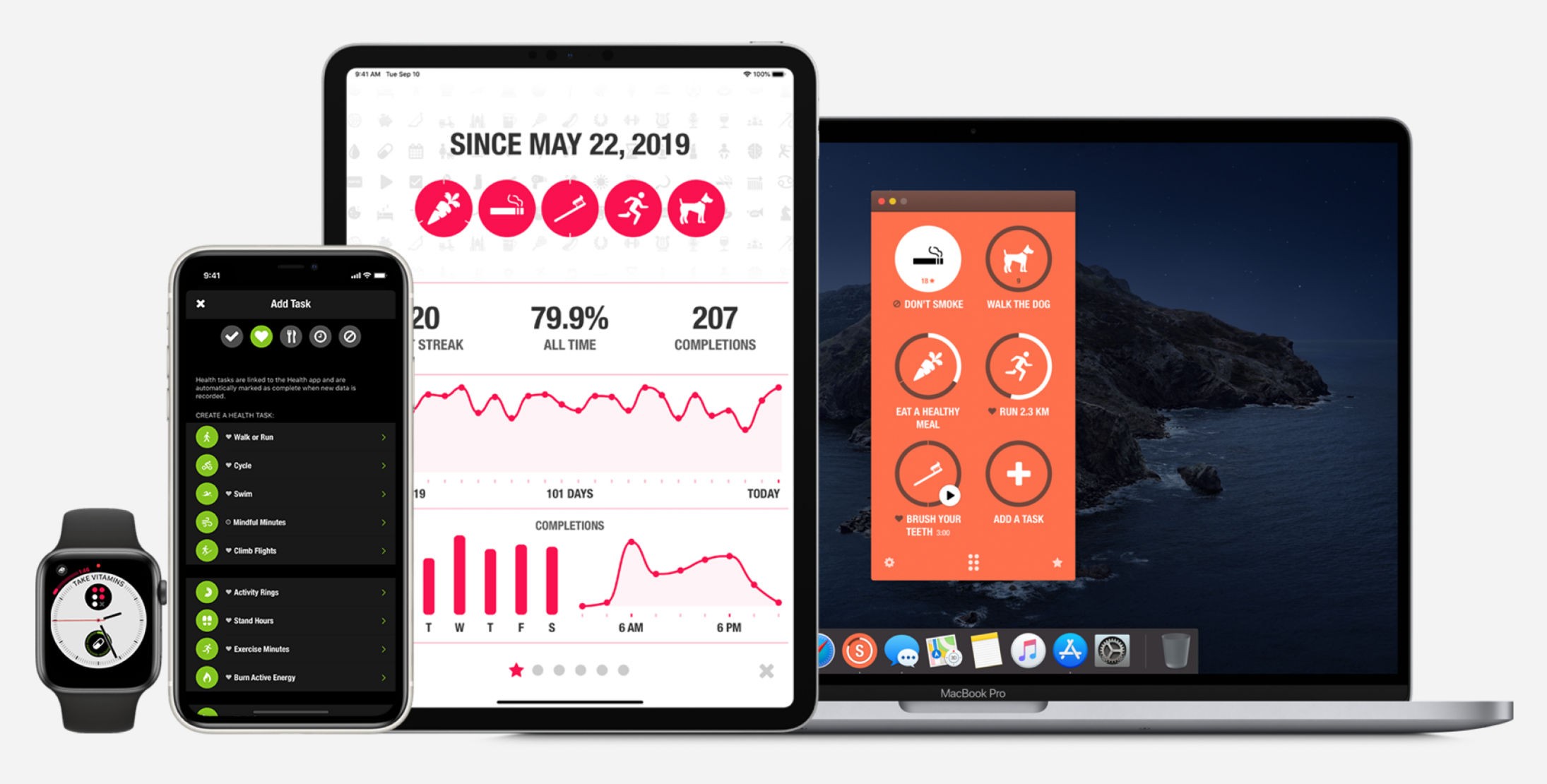
Best for: A simple one-time-purchase tracker on Apple devices.
Streaks is "the habit-forming to-do list" for Apple devices, built around keeping an unbroken daily chain across up to twenty-four tasks. You pay once, with no subscription, and it can auto-complete tasks from Apple Health data like steps or water. It is the app for people who want something clean and finite and are happy to stay on iPhone, Mac and Apple Watch.
Strengths:
A single one-time purchase covers every Apple device, with no subscription.
Auto-completes tasks from Apple Health, plus widgets, Watch complications and Siri Shortcuts.
Supports negative habits, timed tasks and per-task notes.
Limitations:
Apple-only: no Android and no web.
No measurable goal behind a habit, and a hard cap of twenty-four tasks.
Pricing: $5.99 one-time, no subscription
Platforms: iOS, Mac, Apple Watch
Rating: 4.8 on the App Store (US storefront, about 27,000 ratings, August 2026)
Bottom line: Pick Streaks if you want a simple, one-and-done habit chain on Apple hardware. If you want Android, or a habit that feeds a measurable goal, it is not the one.
Way of Life
Best for: Spotting long-run trends at a glance.
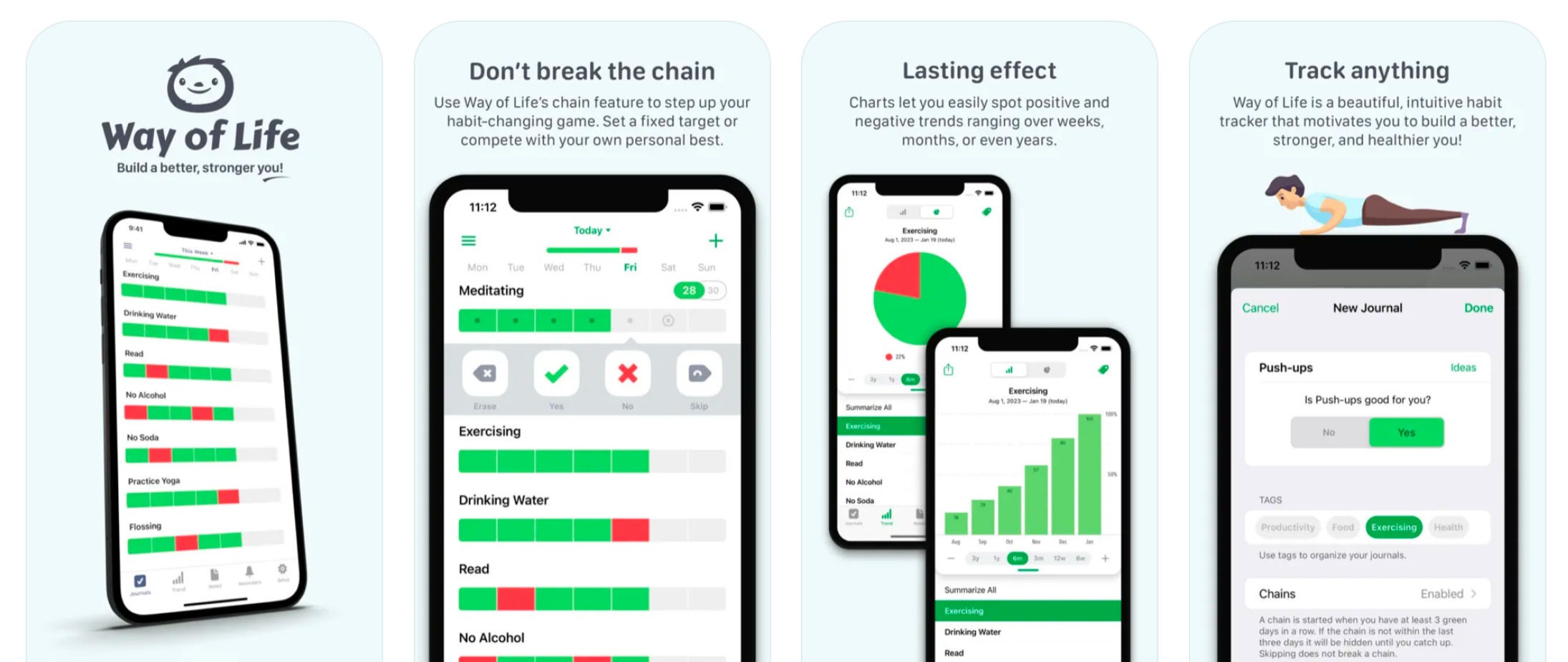
Way of Life is a color-coded habit tracker where you mark each habit daily as Yes, No or Skip, and a Skip records a deliberate rest day without breaking the chain. Its strength is the long view: pie and bar charts show trends over weeks, months and even years, with journal notes to explain what happened. It suits people who care less about today's streak and more about the shape of a habit over time.
Strengths:
Three-state logging where a Skip counts as a planned rest day and keeps the chain intact.
Trend charts spanning weeks to years, with journal notes alongside.
Data portability: CSV and Excel export plus cloud backup.
Limitations:
No goal or outcome object; habits stand entirely alone.
Apple-centric with a separate, thinner Android app, and no web or Windows version.
Pricing: Free (capped); Premium from $4.99
Platforms: iOS, Mac, Android
Rating: 4.8 on the App Store (US storefront, 5,200 ratings, August 2026)
Bottom line: Pick Way of Life if you want to read a habit's trend over months and years at a glance. If you want your habits tied to a goal, or a full-featured Android app, it will fall short.
HabitKit
Best for: Seeing your consistency as a visual wall of color.
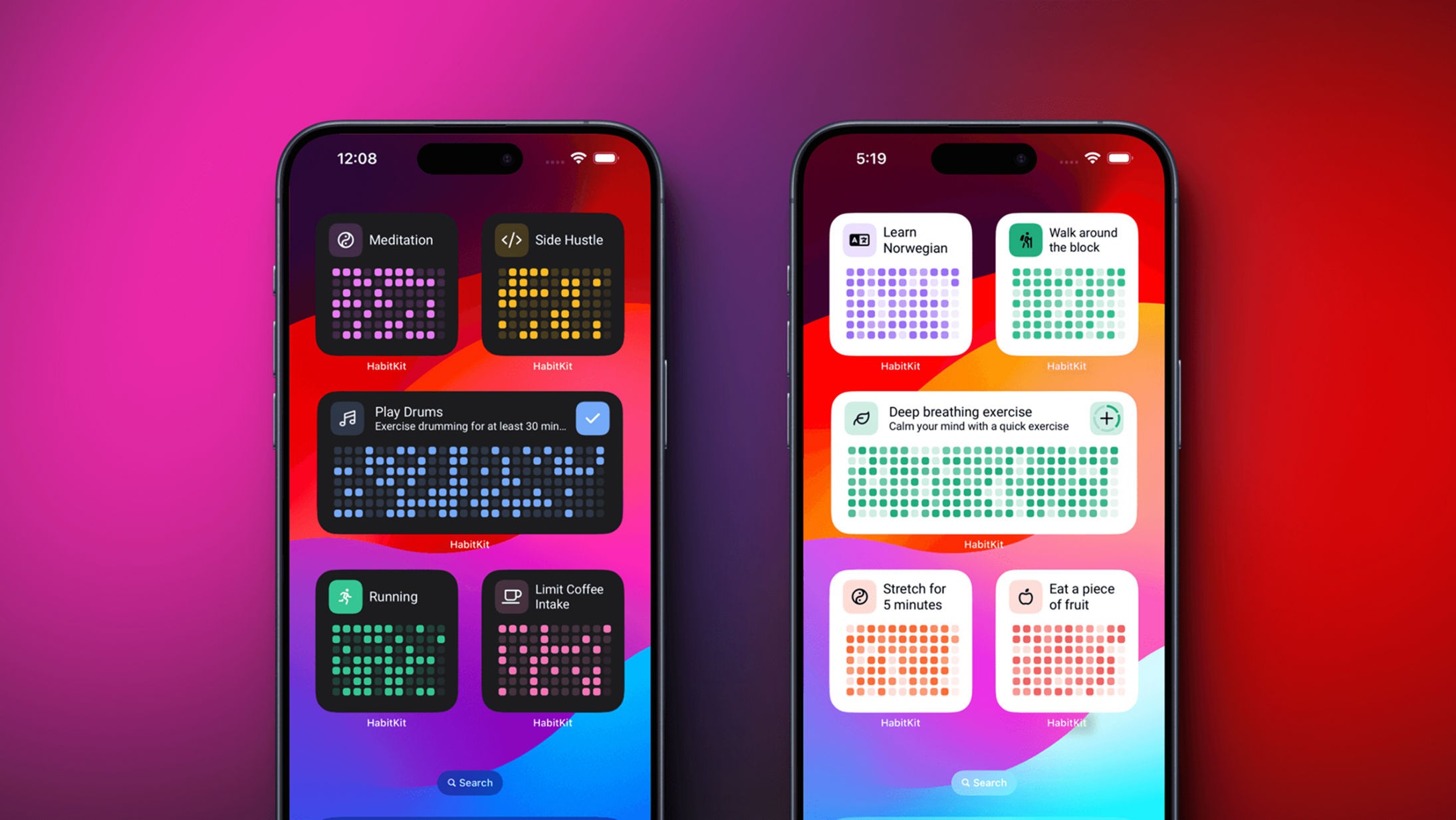
HabitKit is a habit tracker built around a GitHub-style grid, where every day you keep a habit fills another colored tile until your consistency shows up as a wall of color. You set how often a habit should happen, log it more than once a day if you want, and read progress off the grid, a calendar view and a yearly review. It is the pick for people who are motivated by watching a pattern fill in.
Strengths:
The tile-grid visualization makes consistency legible at a glance, and it is the app's real differentiator.
Cross-platform across iOS, Android and Mac, with deep customization, data import and export, and cloud backup.
Handles specific days, a chosen frequency and multiple completions a day.
Limitations:
No goal or outcome behind a habit; it is oriented around streaks and filling the grid.
The free tier limits how many habits you can track, so regular multi-habit use needs Pro.
Pricing: Free (limited habits); Pro from $1.99/month
Platforms: iOS, Android, Mac
Rating: 4.9 on the App Store (US storefront, 2,342 ratings, August 2026)
Bottom line: Pick HabitKit if a grid of filled squares is what keeps you logging. If you want a habit tied to a measurable goal, it stays a streak board with nothing behind it.
Everyday
Best for: The same streak chain on every device you own.
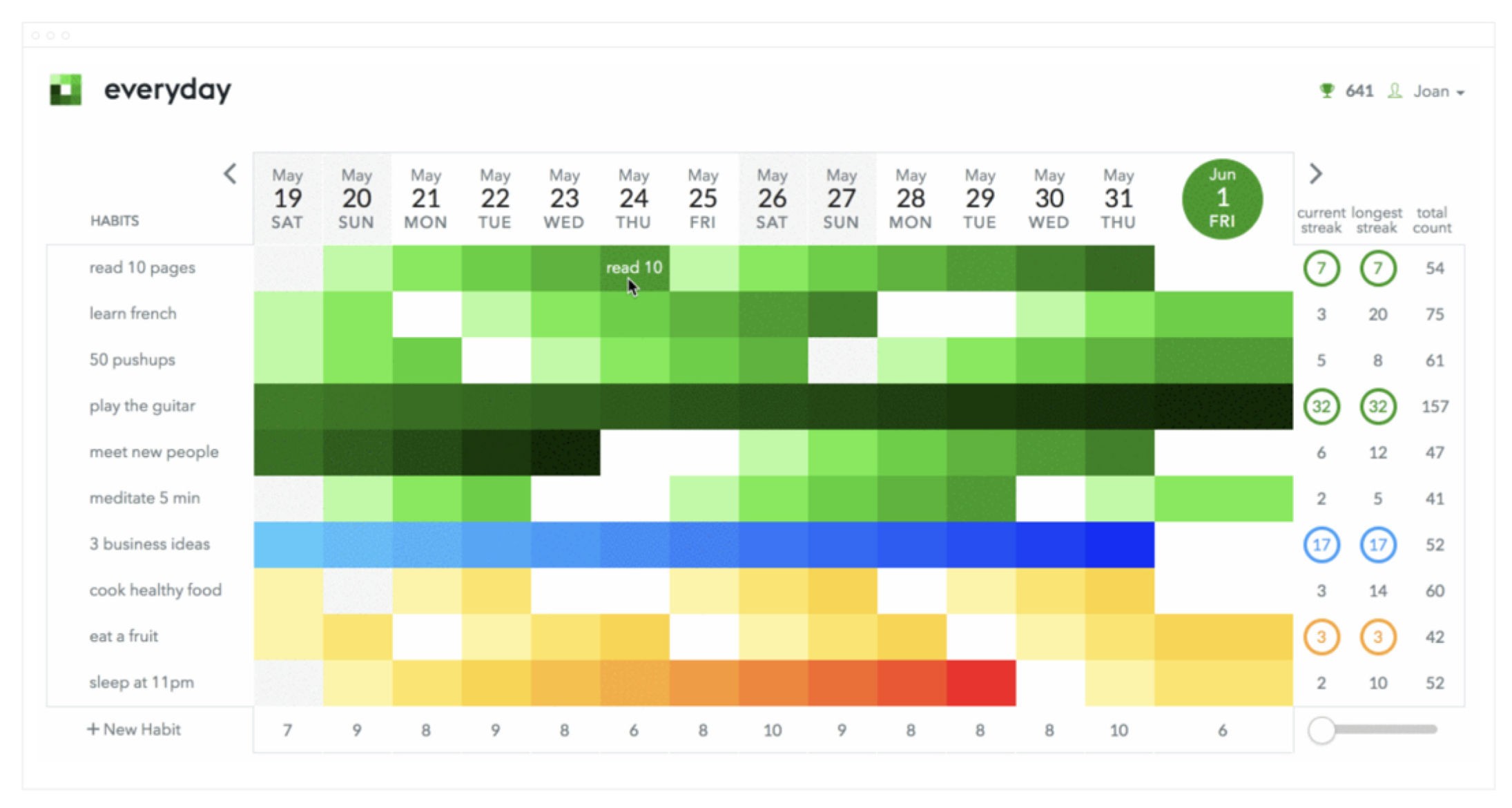
Everyday is a "don't break the chain" habit tracker where you mark a habit done each day and grow an unbroken streak on a visual board. It runs on more platforms than almost anything else here, from web and Android to iPhone, Mac and Apple Watch, with your chains synced across all of them. It suits people who want one simple daily streak they can log wherever they are.
Strengths:
Broad reach: web, iOS, iPad, Mac, Apple Watch and Android, with data synced across all of them.
A clear chain board plus real stats, including current versus longest streak and completion rates.
A break-habit mode for habits you want to quit, where the board fills up as you keep staying away from them.
Limitations:
Scheduling is daily-first, so anything non-daily leans on a manual skip rather than true custom frequencies.
No way to tie a habit to a measurable goal; the chains stand alone.
Pricing: Free (limited habits); Premium $7.49/month or $29.99/year
Platforms: iOS, iPad, Mac, Apple Watch, Android, web
Rating: 4.7 on the App Store (US storefront, about 4,500 ratings, August 2026)
Bottom line: Pick Everyday if you want a simple daily chain that follows you across every device. If you need flexible non-daily schedules or a goal behind the habit, it keeps things deliberately basic.
HabitNow
Best for: An all-in-one Android habit and routine planner.
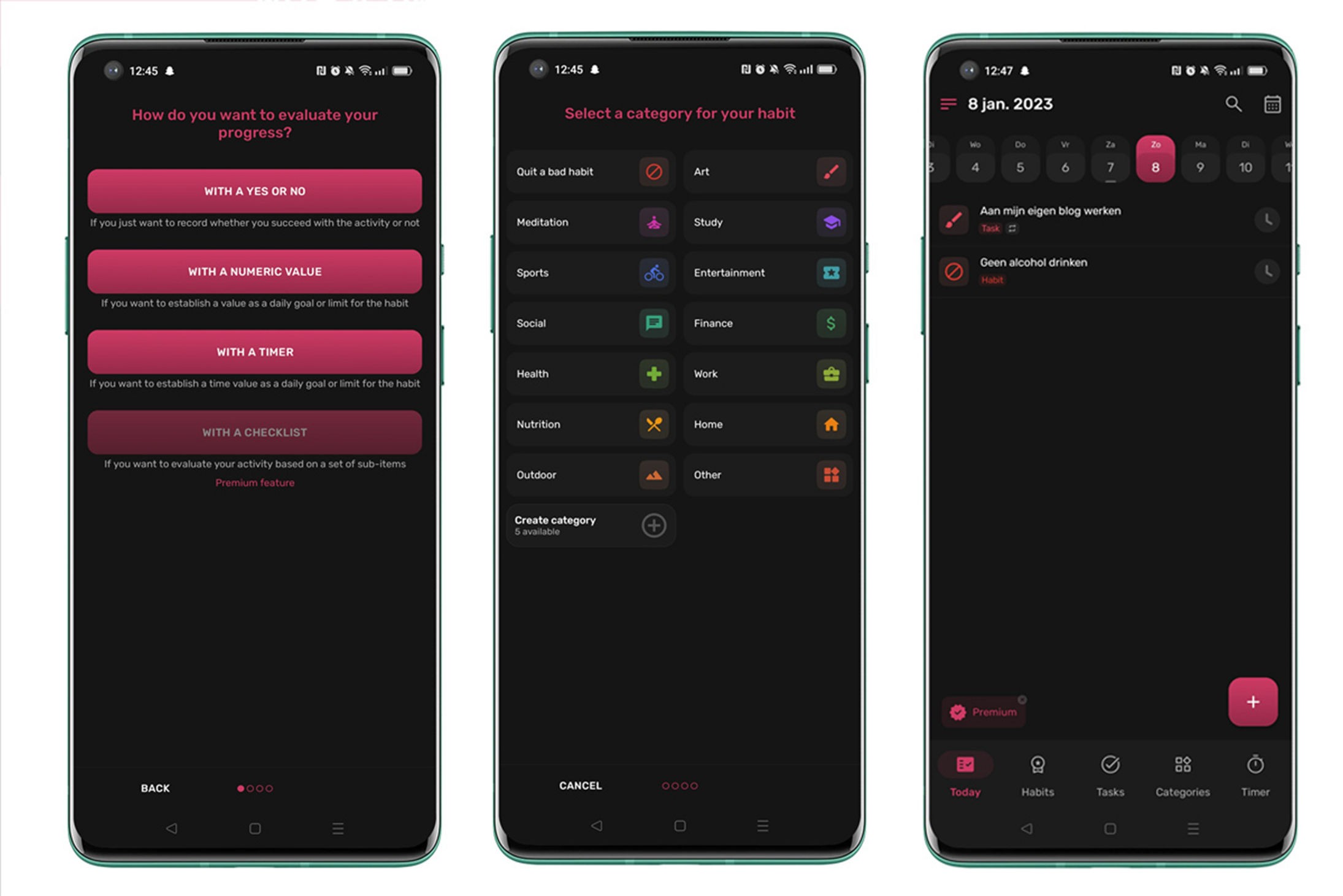
HabitNow is an Android app that bundles habits, to-dos, reminders, timers and a calendar into one place, so your whole daily routine sits together. Habits support flexible frequencies and multiple check-ins a day, and a calendar view, stats and home-screen widgets keep progress visible. It is a strong pick for Android users who want one app for habits and everything around them.
Strengths:
Genuinely all-in-one on Android: habits, tasks, reminders, timers and calendar.
Flexible scheduling: specific days, times per period and multiple completions a day.
One-time premium unlock with no subscription.
Limitations:
Android only: no iOS, web or desktop.
Habits are tracked by streaks and frequency, with no link to a measurable goal.
Pricing: Free version; one-time premium unlock, no subscription
Platforms: Android
Rating: About 4.7 on Google Play (about 91,000 ratings, 2026)
Bottom line: Pick HabitNow if you are on Android and want habits, tasks and reminders in a single planner. If you want cross-platform sync or a goal behind each habit, it is not built for that.
Loop Habit Tracker
Best for: A free, open-source, offline Android tracker.
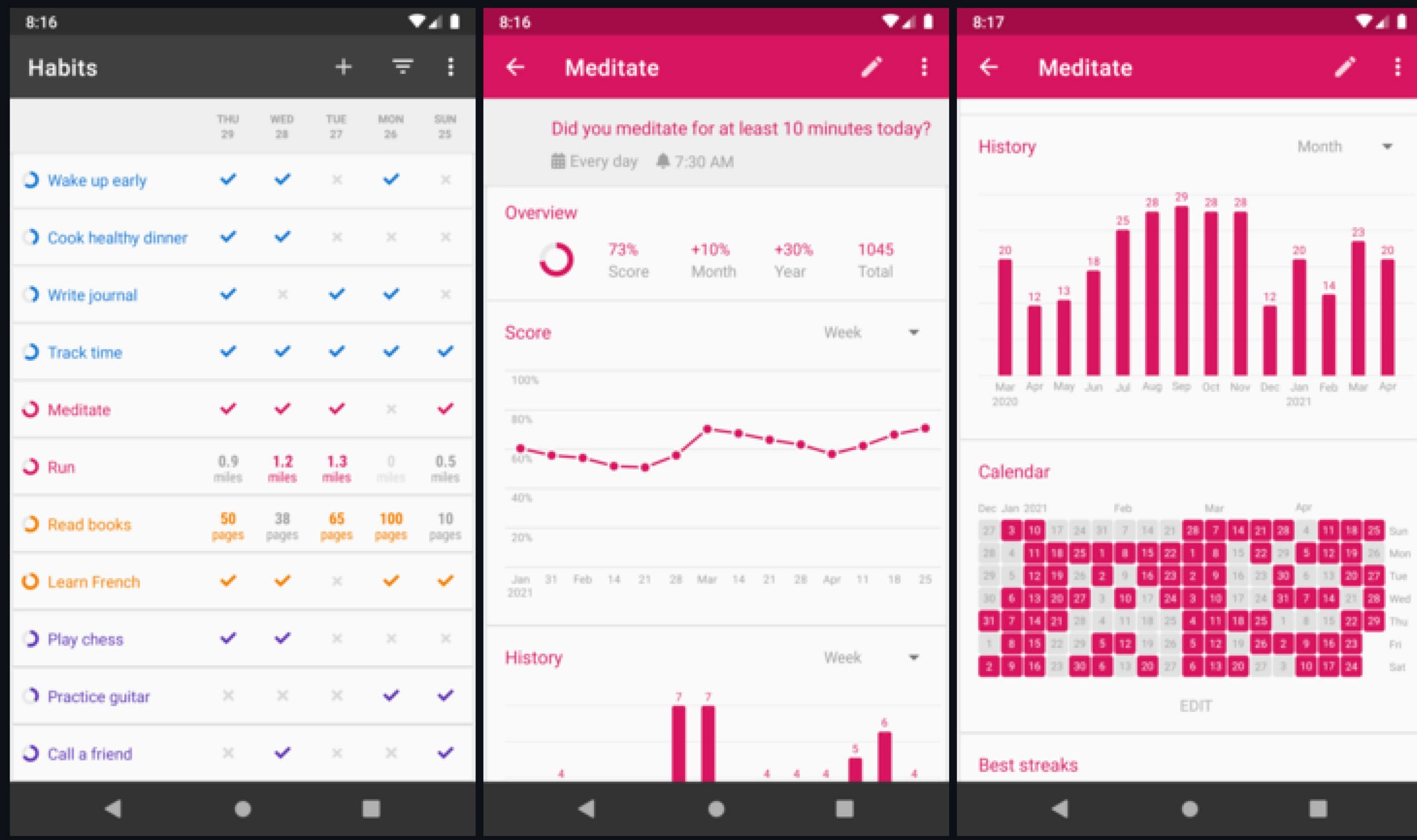
Loop Habit Tracker is a completely free, open-source Android app that works fully offline with no account and no ads. Its signature is a "habit strength" score that rises with every repetition and falls when you miss, so consistency shows up as a number rather than a raw streak. It is the pick for Android users who want a clean, private, no-cost tracker.
Strengths:
Fully free and open-source, with no ads and no paywalled features.
A "habit strength" scoring algorithm plus detailed graphs and history.
Works entirely offline with CSV and SQLite export.
Limitations:
Android only, with no cloud sync or accounts, so data stays on one device.
No goal layer: habits do not link to a measurable outcome.
Pricing: Free and open-source, no ads
Platforms: Android
Rating: About 4.7 on Google Play (about 62,000 ratings, 2026)
Bottom line: Pick Loop if you want a free, private, open-source habit tracker on Android and value a real progress score. If you need cross-device sync or a goal behind your habits, it is intentionally minimal.
Finch

Best for: Habits alongside mental-health self-care.
Finch is a self-care app where you raise a virtual bird by taking care of yourself, completing daily habits and activities to help your pet grow. Around that loop it bundles mood tracking, guided journaling and breathing exercises, so habit-building sits inside a gentler wellbeing routine. It is the pick for people who want encouragement and self-care more than outcome tracking.
Strengths:
A broad self-care toolkit: habits, mood tracking with trends, guided journaling and breathing.
Flexible per-habit scheduling, including specific days and multiple times a day.
A gentle gamification loop that makes consistency feel rewarding.
Limitations:
Self-care oriented, so habits do not roll up into a measurable goal; progress is the pet and your mood.
Mobile only, with no web or desktop version.
Pricing: Free to use; Finch Plus $9.99/month or $69.99/year
Platforms: iOS, Android
Rating: 4.9 on the App Store (US storefront, 741,000 ratings, August 2026)
Bottom line: Pick Finch if you want habit-building wrapped in mental-health self-care and gentle encouragement. If you want measurable goals and outcome analytics, it is built for wellbeing and encouragement rather than results.
How to choose
The right habit tracker depends on what you want a habit to do for you and which device you carry.
If you want each habit to move a goal you can measure, pick Griply. It is the only app here where a habit attaches to a goal with a target and a deadline.
If you want the same habits on every device, pick Habitify, TickTick or Everyday. All three sync across mobile, web and desktop.
If you are on Android, pick HabitNow for an all-in-one planner or Loop Habit Tracker for a free, open-source option.
If you do not want a subscription, pick Streaks for a one-time Apple purchase or Loop, which is free.
If game mechanics keep you going, pick Habitica for party accountability or Finch for gentle self-care.
If you want your consistency as a visual wall, pick HabitKit for its GitHub-style tile grid.
If you think in measurable targets, pick Strides for its target-by-date pace line on Apple devices.
Why most habits fade by February
Most habits fail the same way. You pick one in January, the app rewards you with a streak, and the streak quietly becomes the point. But a streak is not a reason. It records that you showed up without capturing why it mattered, so the day a trip or a busy stretch finally breaks the chain, you have no reason left to start again. A habit only survives a broken streak when it is working toward something you actually want, and the reason you began, whether that was getting stronger, shipping the book or sleeping better, was never in the app. It lived in your head, disconnected from the daily action meant to serve it.
This is the gap the shortlist splits on. Streaks, Way of Life, HabitKit, Everyday, Loop, HabitNow and Habitica are all built to protect the chain, and they do that well, but the habit floats free of any larger why. Habitify and Strides get closer by putting a measurable target on the habit or in a separate tracker, so at least the number means something. Griply is the only one that closes the loop: the habit hangs off a goal with its own metric, so a missed day shows up as a dip in a chart you are still trying to move, rather than a broken streak you abandon. That connection is what turns a habit from a game you eventually lose into a means to an end you still want. When the streak breaks, and it will, the goal is still there, and so is the reason to begin again tomorrow.
Start building habits that move a goal
Griply is for people who want their daily habits to feed a goal they can measure, so a streak finally adds up to something. If that is you, it is free to start, and there is nothing to lose in trying it for one goal this week.
Start for free, and if you want ideas or accountability, come say hello in the Griply community.
What should I look for in a habit tracker app?
Look for flexible scheduling so a habit survives a busy week, a progress view that shows more than a streak, sync to the device you actually use, and, if you want habits to add up to something, a link from each habit to a measurable goal. Only Griply offers that last one here.
What is the best free habit tracker app?
Loop Habit Tracker is the most capable fully free option, but it is Android-only and open-source. Habitica is free to use on iOS, Android and web with an optional cosmetic subscription. Griply's free plan covers two goals and two habits with full progress charts.
What is the best habit tracker for Android?
HabitNow is the strongest all-in-one Android app, bundling habits, tasks and reminders. Loop Habit Tracker is the best free, open-source choice. TickTick and Habitify also run well on Android if you want cross-device sync.
Is there a habit tracker without a subscription?
Yes. Streaks is a one-time $5.99 purchase on Apple devices with no subscription, and Loop Habit Tracker is completely free and open-source on Android. HabitNow offers a one-time premium unlock rather than a recurring plan.
What is the best gamified habit tracker?
Habitica is the most fully gamified, turning habits into a role-playing game with party accountability. Finch is the gentler option, growing a virtual pet as you complete self-care habits. Both use play to keep you consistent rather than charts.
What is the difference between a habit tracker and a goal tracker?
A habit tracker records whether you completed a recurring action, usually as a streak. A goal tracker measures progress toward an outcome with a target and a deadline. Most apps do one or the other; Griply links the two, so a habit feeds the goal it serves.
What is the best habit tracker that connects to your goals?
Griply is the only app on this list where every habit attaches to a measurable goal it feeds, through its goal hierarchy. Habitify and Strides put a target on the habit itself but do not link it to a separate goal. See the best habit tracker connected to your goals for more.
What is the best habit tracker app for ADHD?
The best fit depends on what keeps you engaged: Habitica and Finch use game mechanics and rewards, while Griply ties habits to a visible goal so the daily action has an obvious point. We cover this in detail on the best habit tracker for ADHD.
Do habit tracker apps really work?
They help when the habit is tied to a reason you care about and the schedule fits your life; they fail when the streak becomes the only goal. An app that links a habit to an outcome tends to last longer. More on whether habit tracker apps work.
Does Apple have a built-in habit tracker?
No. Apple has no dedicated habit tracker; people improvise with Reminders or the Health app. Third-party apps like Streaks, Griply or Habitify fill the gap. See whether Apple has a habit tracker.
