

Table of Contents
The best life planner apps in 2026 are Griply, Timestripe, Notion, ClickUp, TickTick, Sunsama, Todoist, Things 3, Motion, and Any.do. We ranked them on the thing that separates a life planner from a tidy to-do list: whether the app connects your daily tasks to the bigger life behind them, as well as whether it organizes life into areas, plans across time horizons, and holds everything in one place. The frustration here is familiar. You set up a beautiful system in January, sort every list and note, and by spring you are drifting again, because the app organized your week but never the life underneath it. Most apps that promise to organize your life organize the surface: your lists, your notes, your calendar. Almost none connect that daily activity to the longer-term life you are trying to build. This page is for anyone who wants their days to add up to a life they chose on purpose. That is where Griply starts, and it is why it leads the list. Every other app here still earns its place.
We make Griply, so it is one of the ten apps here and it was held to the same criteria as the rest. Every app is scored on what its own documentation and our hands-on testing show, each one is the best choice for a particular way of organizing a life, and you should pick the app that fits how you work.
The best life planner apps at a glance
Griply: the only planner here that runs on life areas and connects your day up to the goals behind it; iOS, web, Mac and Windows; free plan (2 goals, 2 habits), Premium $4.99/month or $29.99/year.
Timestripe: a Horizons system that shows your goals from today out to your lifetime; web, iOS, Android, Mac; free tier, Pro from $9.99/month or $49.99/year.
Notion: a build-your-own workspace where you design your life system yourself; iOS, Android, web, Mac, Windows; free for individuals, Plus $12/month or $120/year.
ClickUp: a work platform with goals and docs, doubling as a life OS; web, Mac, Windows, Linux, iOS, Android; free forever, Unlimited from $7/user/month billed yearly.
TickTick: an all-in-one of tasks, habits and calendar on every device; iOS, Android, Mac, Windows, Linux, web; free tier, Premium $4.99/month or $49.99/year.
Sunsama: a calm guided ritual for planning your days and weeks; iOS, Android, Mac, Windows, Linux, web; no free plan, $22/month or $17/month billed yearly.
Todoist: a fast, clean task manager for capturing and sorting; iOS, Android, Mac, Windows, Linux, web; free tier, Pro $6.99/month or $59.99/year.
Things 3: a polished Apple-only task planner with life Areas; iOS, iPad, Mac; one-time purchase per platform, no subscription.
Motion: an AI that auto-schedules your tasks onto the calendar; iOS, Android, Windows, web; no free plan, from $19/month billed yearly.
Any.do: a simple, free to-do list, calendar and reminders in one; iOS, Android, Mac, Windows, web; free plan, Premium from $4.99/month billed yearly.
Comparison
App | Links day to life goals | Organizes by life area | Plans across horizons | All-in-one | Best for |
|---|---|---|---|---|---|
Griply | Yes, tasks can show their goal | Life areas built in | Yes, vision + roadmap | Goals, habits, tasks | A life planned around your goals |
Timestripe | Yes, by time horizon | Partly, via boards | Day to lifetime, its core | Goals, notes, calendar | Seeing day-to-lifetime in one view |
Notion | No, you build it yourself | Build your own | Manual | Notes, databases, tasks | Designing your own life system |
ClickUp | Partly, work-shaped goals | No, work spaces | No | Tasks, goals, docs | Running life inside a work tool |
TickTick | No | No, flat lists | No, calendar only | Tasks, habits, calendar | An all-in-one on any device |
Sunsama | Weekly objectives only | No | Day and week only | Guided daily planner | A calm weekly planning ritual |
Todoist | No, its Goals beta was retired | No, projects | No | Tasks only | A fast, clean task list |
Things 3 | No | Areas, on Apple only | No | Tasks only | A polished Apple task planner |
Motion | No | No, projects | No | AI tasks plus calendar | Letting AI schedule your work |
Any.do | No | No, flat lists | No | To-do plus calendar | A simple free organizer |
What makes a good life planner app
It is the same trap each time: these apps organize the surface of your life, your lists, notes and calendar, and leave the life underneath untouched. Four things separate the ones that organize a life from the ones that only tidy a week.
Does it connect your day to your life goals? Without that link, you can run a spotless system and still drift, because nothing tells you whether today served anything you actually want. This is where these ten apps differ most. We checked it by building a real goal in each one, then seeing whether a daily task could point back at it. Griply and Timestripe are the two that close the loop: in Griply your tasks can show the goal and life area they serve, and Timestripe lines your days up under goals that run out to your lifetime. ClickUp has a goals feature shaped for work, Sunsama reaches up to the week, and the rest organize the day on its own.
Does it organize your life into areas? A life is not one flat list; it is health, work, relationships and money pulling at once, and an app that keeps them separate helps you see where you are overinvested. Griply builds life areas in as the top of its structure, and Things 3 has Areas that come close, though only for grouping. Notion and ClickUp let you build areas yourself, and the task managers keep a single project list.
Does it plan across time horizons? A plan that only sees today cannot tell you whether this week is moving a five-year hope. Timestripe is the standout here, with five nested horizons from day to lifetime, and Griply pairs a long-term vision with a goal roadmap over months and years. Everyone else is anchored to the next few days.
Is it all-in-one? Juggling a separate app for tasks, habits, notes and goals is its own kind of disorganization. Notion and ClickUp are the widest, holding notes, databases and tasks in one workspace, and Griply and TickTick bring goals, habits and tasks together. The dedicated task managers do one thing well and leave the rest to other apps.
How we tested and chose these apps
We started from the independent roundups that rank for organizing your life and kept the apps they most often name, then added Griply as the goal-first option those lists leave out. We installed and used all ten ourselves: in each app we set up a real life area or two, tried to connect a daily task up to a longer-term goal, and looked at how far ahead it let us plan. Every price, platform and rating was read from the vendor's own page or the US App Store on 21 August 2026, and where an app cannot do something, we say so rather than guessing. We scoped the list to apps that plan and organize your life, so pure calendar apps and paper planners are left out.
The best life planner apps in 2026
Griply
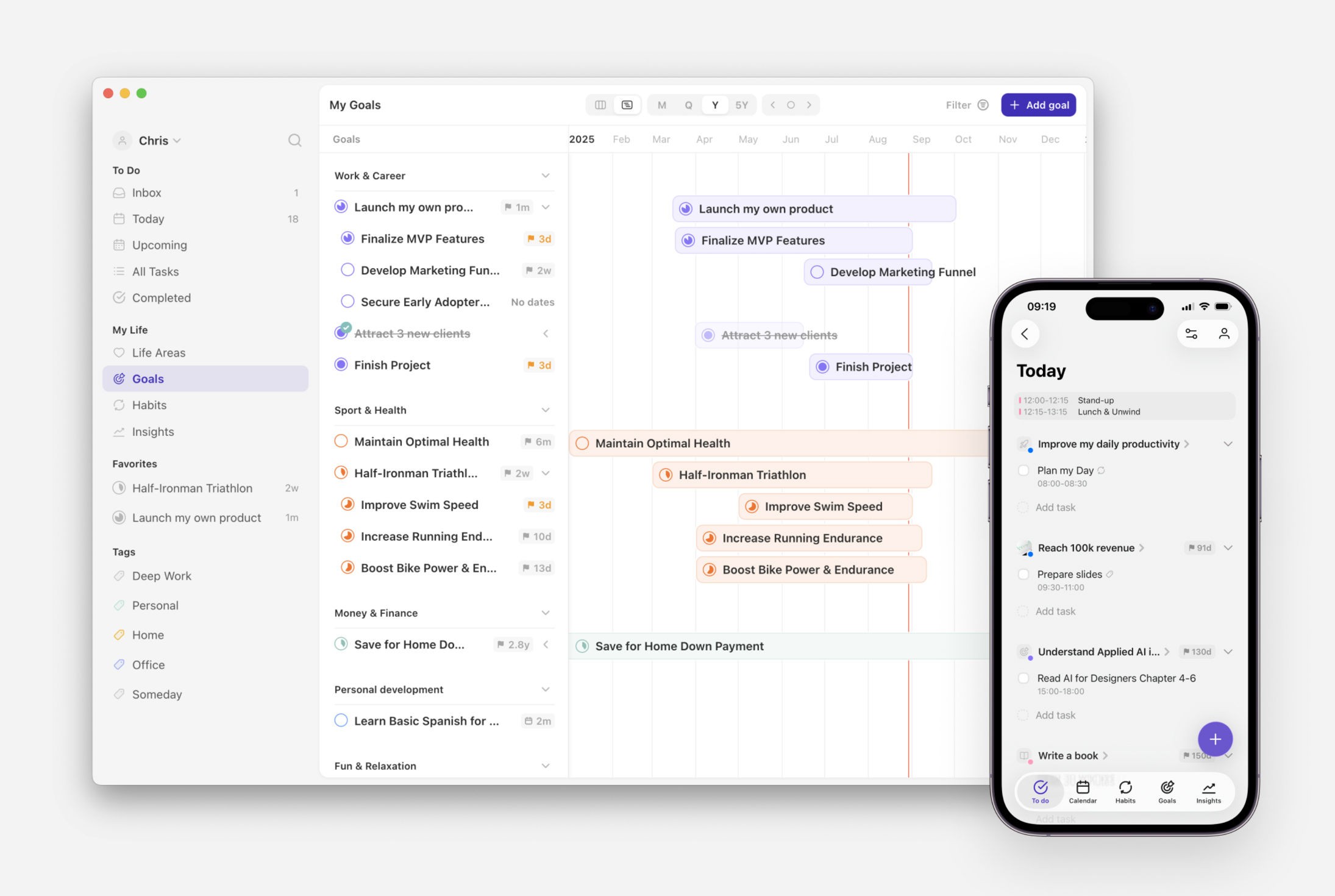
Best for: A life planned around your goals.
Griply is a goal-first life planner built on a single structure: Life Area → Vision → Goal → Subgoal → Task/Habit. You start from the areas of your life and the vision for each, set goals underneath them, and your daily tasks and habits can hang off the goal they serve, so a day in Griply shows you what to do and which part of your life it moves. It is built for people who want their planning to answer to something bigger than this week.

Strengths:
Life areas are the top of the structure, so health, work and relationships each get their own place rather than one flat list.
Tasks and habits can link up to a goal, subgoal or life area, and the goal carries a real metric you can chart.
Goals, habits, tasks and a time-blocked Today live in one app, with a goal roadmap that lays your plans out over months and years.
Limitations:
No Android app yet, so Android users are on the waitlist for now.
The goal-first structure is more to set up than someone who only wants a quick list needs.
Pricing: Free (2 goals, 2 habits, unlimited tasks); Premium $4.99/month or $29.99/year
Platforms: iOS, web, Mac, Windows
Rating: 4.6 on the App Store (US storefront, 192 ratings, August 2026)
Bottom line: Pick Griply if you want to organize your life around goals you can measure, from the life area down to today. If you are on Android, or you want a pure notes-and-database canvas to design yourself, one of the apps below will fit better.
Timestripe
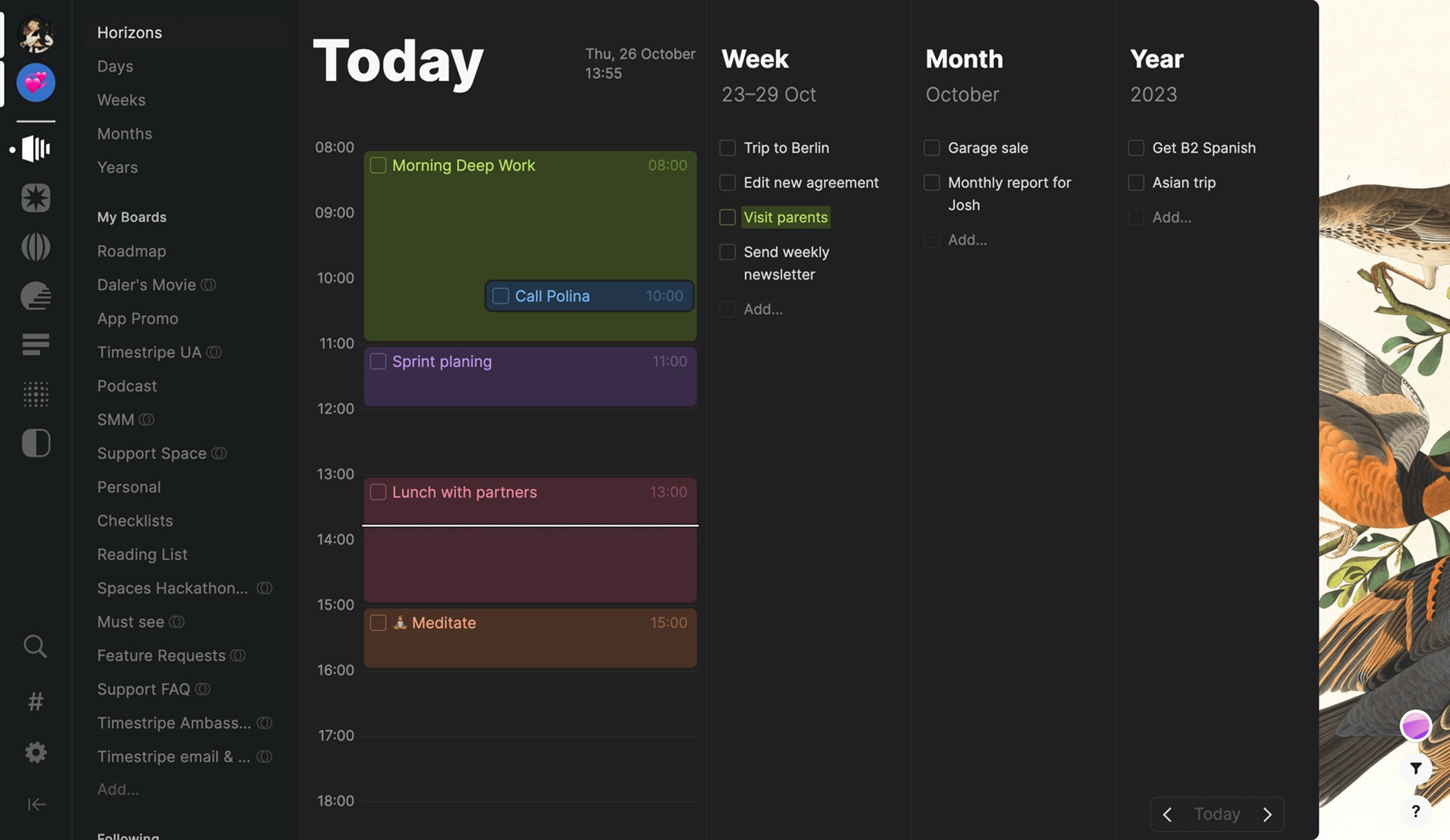
Best for: Seeing your life from today out to a lifetime.
Timestripe is a planner built around Horizons: you set goals at five nested levels, from day and week up to year and lifetime, so a single view shows how today ladders into who you want to become. It adds boards for lists, rich notes, a calendar, and guided programs called Climbs that walk you through longer ambitions. It is the pick for people who think in decades rather than weeks.
Strengths:
The Horizons view puts five nested levels, from day to lifetime, in one screen.
Goals connect across boards and the calendar, so daily items line up under longer-term aims.
A broad surface: boards, rich-text notes, a calendar and guided Climbs in one place.
Limitations:
No confirmed habit tracking with streaks or completion stats, and goals link by horizon rather than a measurable target.
Organizing around several horizons plus boards is more to learn than a flat list.
Pricing: Free tier; Pro from $9.99/month or $49.99/year
Platforms: web, iOS, Android, Mac
Rating: 4.5 on the App Store (US storefront, 122 ratings, August 2026)
Bottom line: Pick Timestripe if seeing your day sitting under a lifetime goal is what keeps you oriented. If you want measurable goal progress or real habit tracking, it stays a horizons-and-goals canvas.
Notion

Best for: Designing your own life system.
Notion is a page editor with databases underneath, and for organizing your life that means you can model areas, goals, habits and reviews however you like, feeding one set of data into many views. A huge template library means you rarely start from a blank page. It is the choice for people who enjoy building a system exactly to their taste and will keep it running.
Strengths:
Databases, relations and rollups are free for one person, enough to model an entire life OS.
A vast template library aimed at personal organization, so you can start from someone else's system.
One workspace holds notes, databases and tasks together.
Limitations:
Nothing connects your day to a goal on its own; every structure is one you design and maintain.
The upkeep is yours, and a system left untended quietly falls apart.
Pricing: Free for individuals; Plus $12/month or $120/year
Platforms: iOS, Android, web, Mac, Windows
Rating: 4.8 on the App Store (US storefront, 89,783 ratings, August 2026)
Bottom line: Pick Notion if building and maintaining your own life system is the part you enjoy. If you want the structure to come built in and connect to your goals for you, that is exactly what it leaves to you.
ClickUp
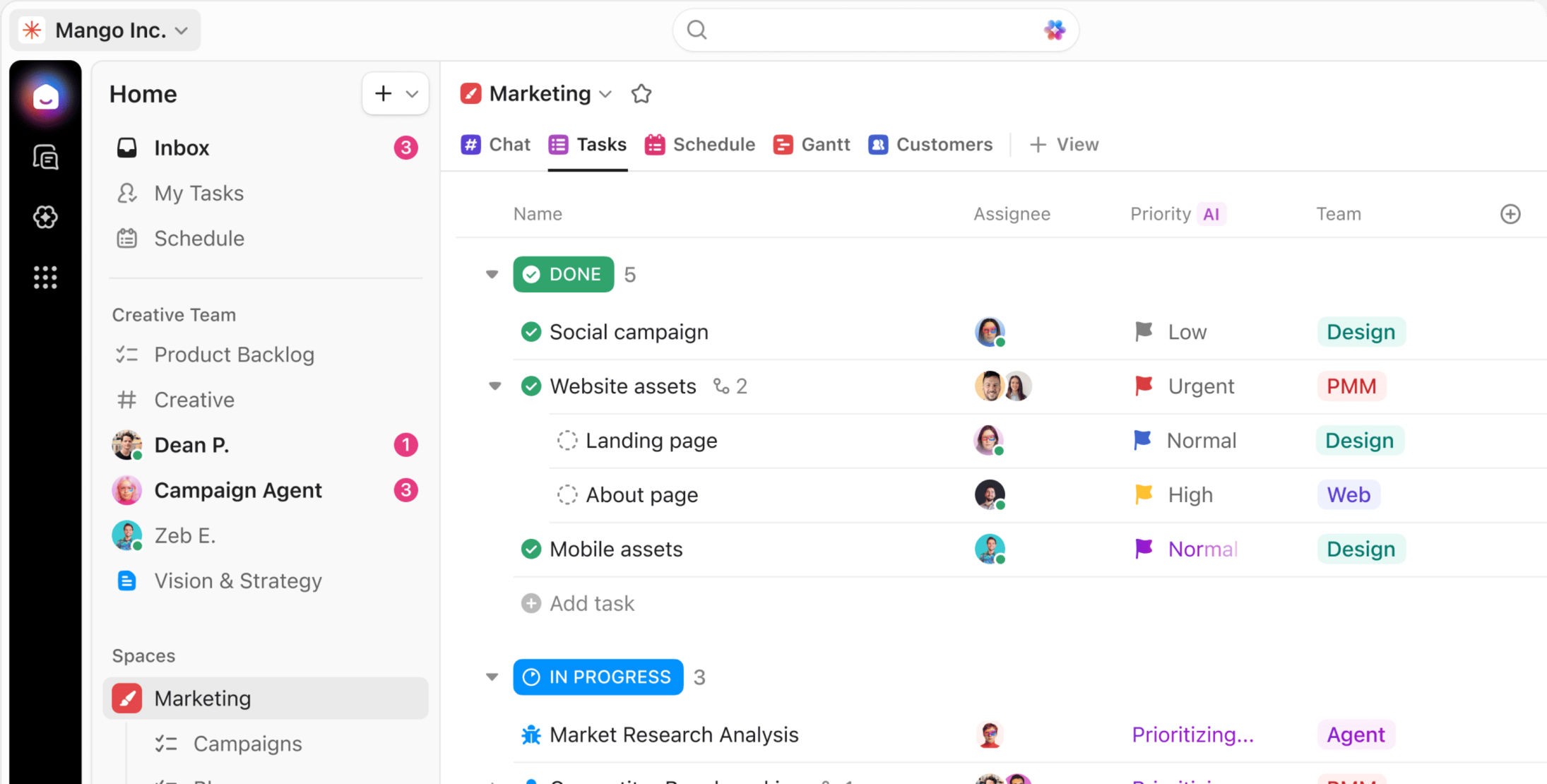
Best for: Running your life inside a work tool.
ClickUp is a work platform that replaces a stack of team tools, and personal organization is one thing it can hold. Its Goals feature carries real targets that tasks and lists can feed, and its docs and spaces can double as a life dashboard. It suits people whose work already lives in ClickUp and who would rather not open a second app for the rest.
Strengths:
A ClickUp goal holds a start value, a target and a unit, and tasks can feed it automatically.
Tasks, goals and docs sit in one platform, so work and life share a workspace.
The free plan includes its goals feature.
Limitations:
No habit tracking at all, and its spaces are shaped for work rather than life areas.
It charges per seat, so one person pays a team price to organize their own life.
Pricing: Free forever; Unlimited $10/user/month or $7/user/month billed yearly; Business $19/user/month
Platforms: web, Mac, Windows, Linux, iOS, Android
Rating: 4.7 on the App Store (US storefront, 9,364 ratings, August 2026)
Bottom line: Pick ClickUp if your work already lives there and you want goals and docs in the same place. If you want habits or a structure built around life rather than projects, it is heavier than it needs to be.
TickTick
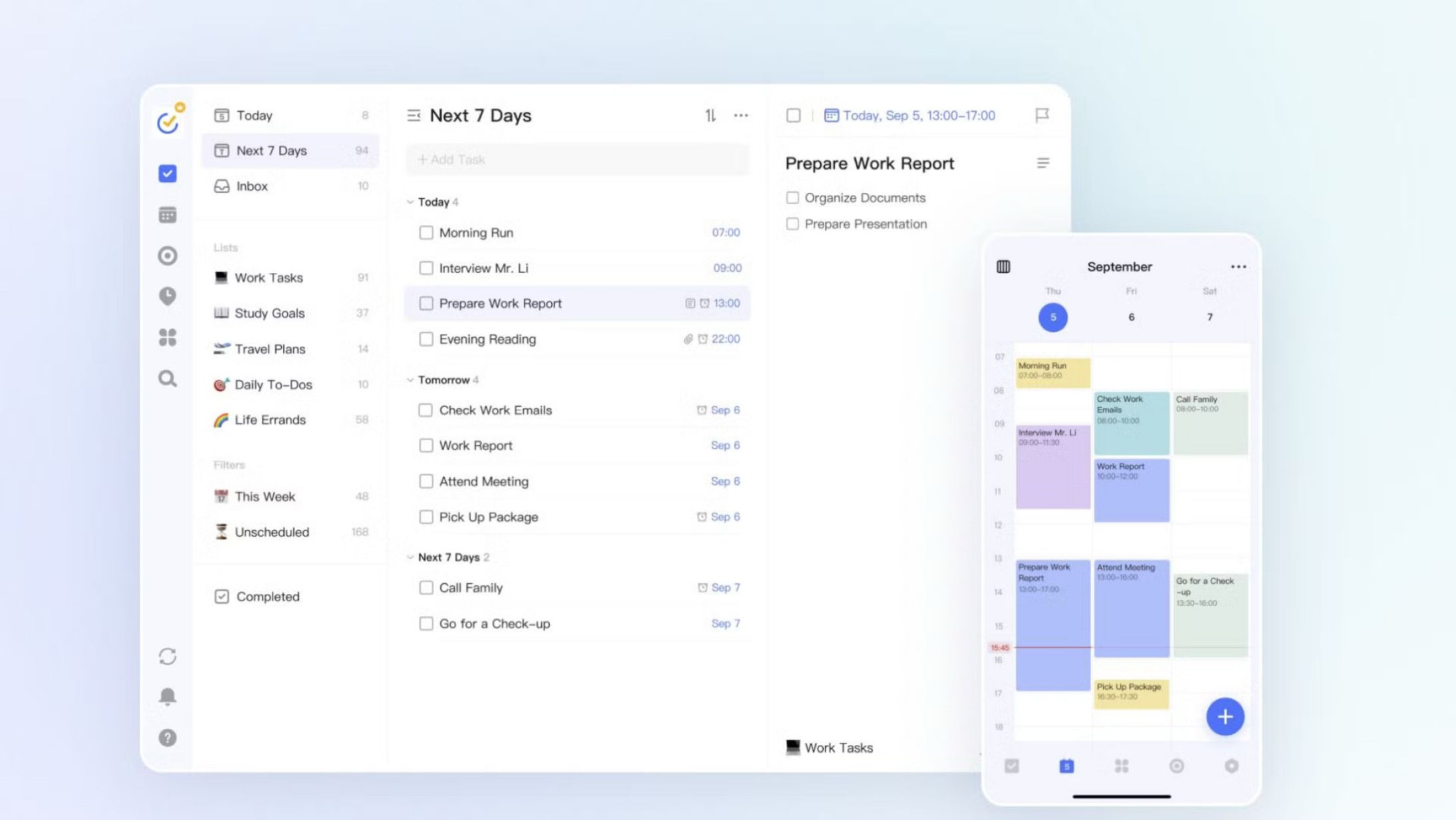
Best for: An all-in-one on any device.
TickTick is a task manager with a calendar and a habit tracker built in, so tasks, routines and your schedule share one low-cost app that runs almost everywhere. It plans the day well and keeps your habits beside your to-dos. It is a lot of organizer for the price, if you do not need a goal layer above it all.
Strengths:
Tasks, habits, a calendar and a Pomodoro timer in one app, on the widest platform spread here.
Real calendar views with time blocks, plus Google Calendar integration.
A useful free tier and a low annual price.
Limitations:
Habits and tasks live in separate modules, with no link up to a longer-term goal or life area.
It organizes into flat lists rather than areas of your life.
Pricing: Free (9 lists, 99 tasks each); Premium $4.99/month or $49.99/year
Platforms: iOS, Android, Mac, Windows, Linux, web
Rating: 4.9 on the App Store (US storefront, 45,000 ratings, August 2026)
Bottom line: Pick TickTick if you want a capable, cheap all-in-one across every device. If you want your lists to answer to a bigger goal, it keeps them flat.
Sunsama
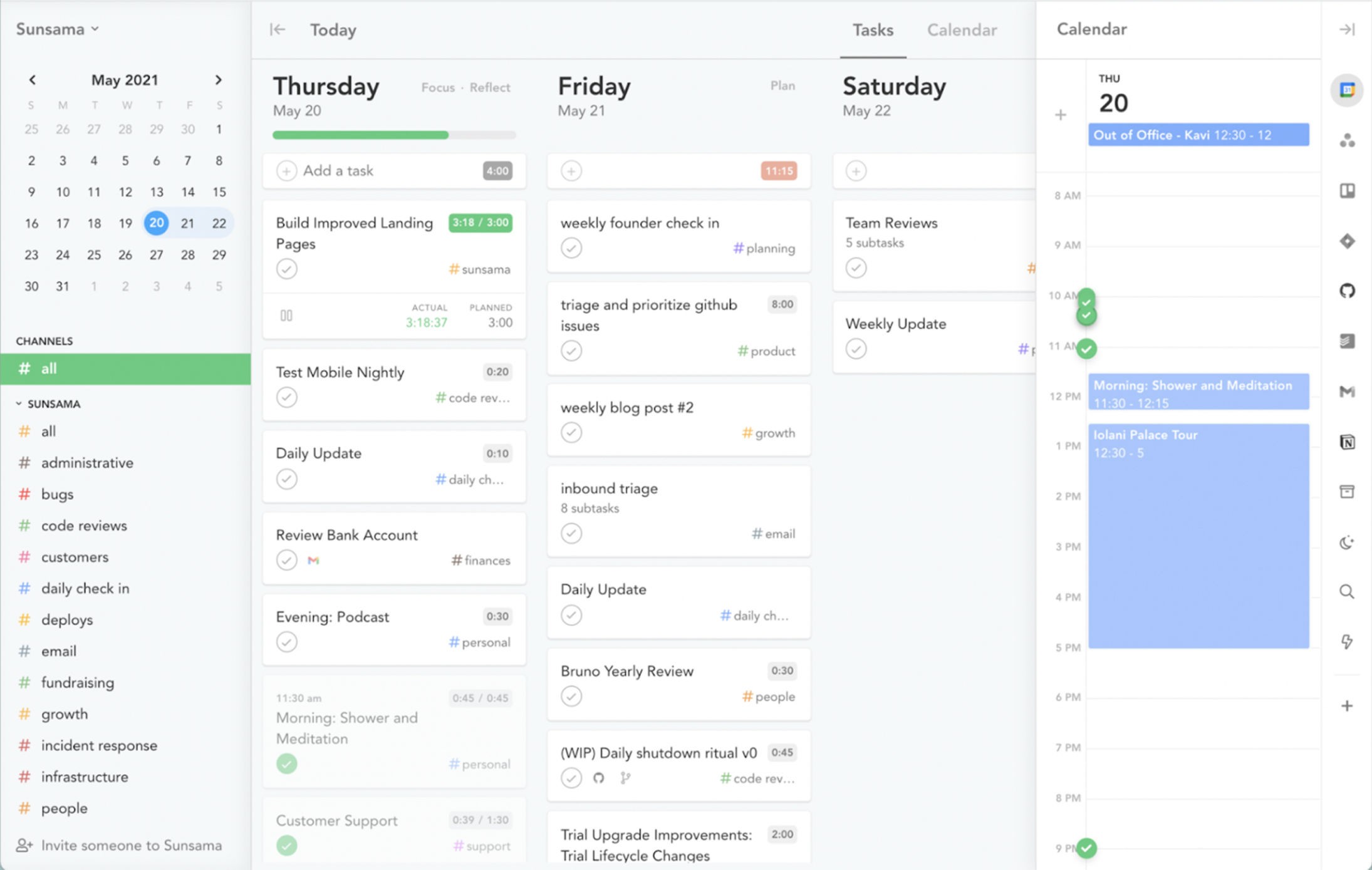
Best for: A calm weekly planning ritual.
Sunsama is a guided planner for people who want to slow down and plan on purpose. Each day you pull tasks from your other tools, time-block them onto a calendar, and set objectives for the week, closing the day with a shutdown and reflection. It organizes the near term beautifully, if the near term is what you want organized.
Strengths:
A structured daily and weekly ritual, with an end-of-day shutdown and reflection.
Pulls tasks from many other tools into one place and time-blocks them.
Two-way calendar sync in a single unified view.
Limitations:
Its longest horizon is weekly objectives, so it does not reach the year or the life behind it.
No free plan, and the price sits at the premium end.
Pricing: No free plan (14-day trial); $22/month or $17/month billed yearly
Platforms: iOS, Android, Mac, Windows, Linux, web
Rating: 4.5 on the App Store (US storefront, 476 ratings, August 2026)
Bottom line: Pick Sunsama if a calm weekly ritual is what keeps you on track. If you want to organize a whole life rather than a strong week, it stops short.
Todoist
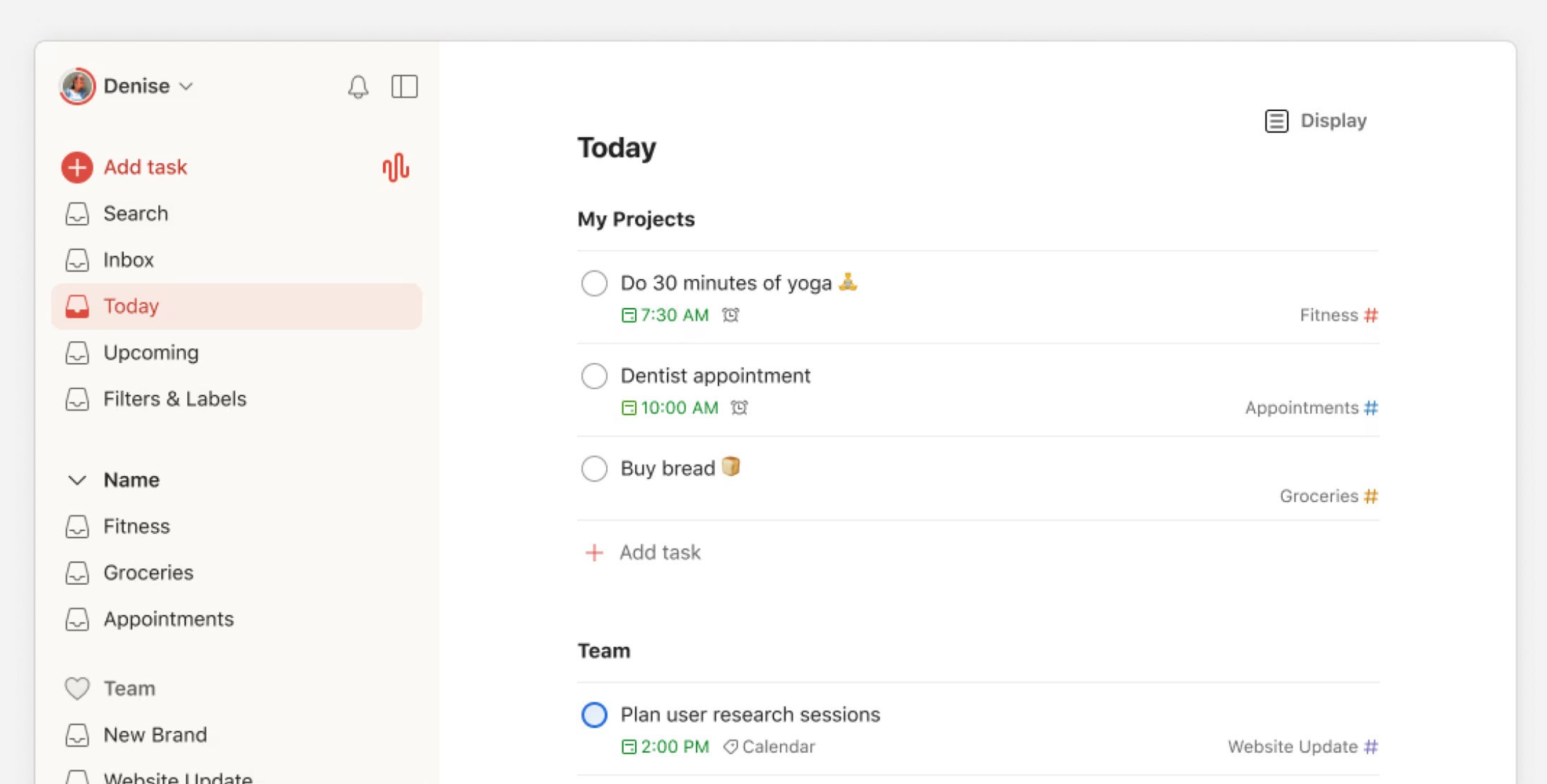
Best for: A fast, clean task list.
Todoist is a fast, well-built task manager for capturing what you need to do and sorting it into projects. Its Today view gathers everything due, and natural-language entry makes adding tasks quick. It is the pick for people who want a reliable list, and who keep their bigger planning somewhere else.
Strengths:
Quick natural-language capture and a clean Today view for planning the day.
Runs almost everywhere, from Linux and Windows to Apple Watch.
A generous free tier for personal use.
Limitations:
Its Goals beta, which linked tasks to a target, was retired in July 2026, so nothing connects the day to a goal.
It organizes into projects rather than life areas, and has no habits.
Pricing: Free (5 projects); Pro $6.99/month or $59.99/year
Platforms: iOS, Android, Mac, Windows, Linux, web
Rating: 4.8 on the App Store (US storefront, 128,000 ratings, August 2026)
Bottom line: Pick Todoist if you want a fast, dependable list to work from. If you want that list tied to the life behind it, it is built to stop at the task.
Things 3
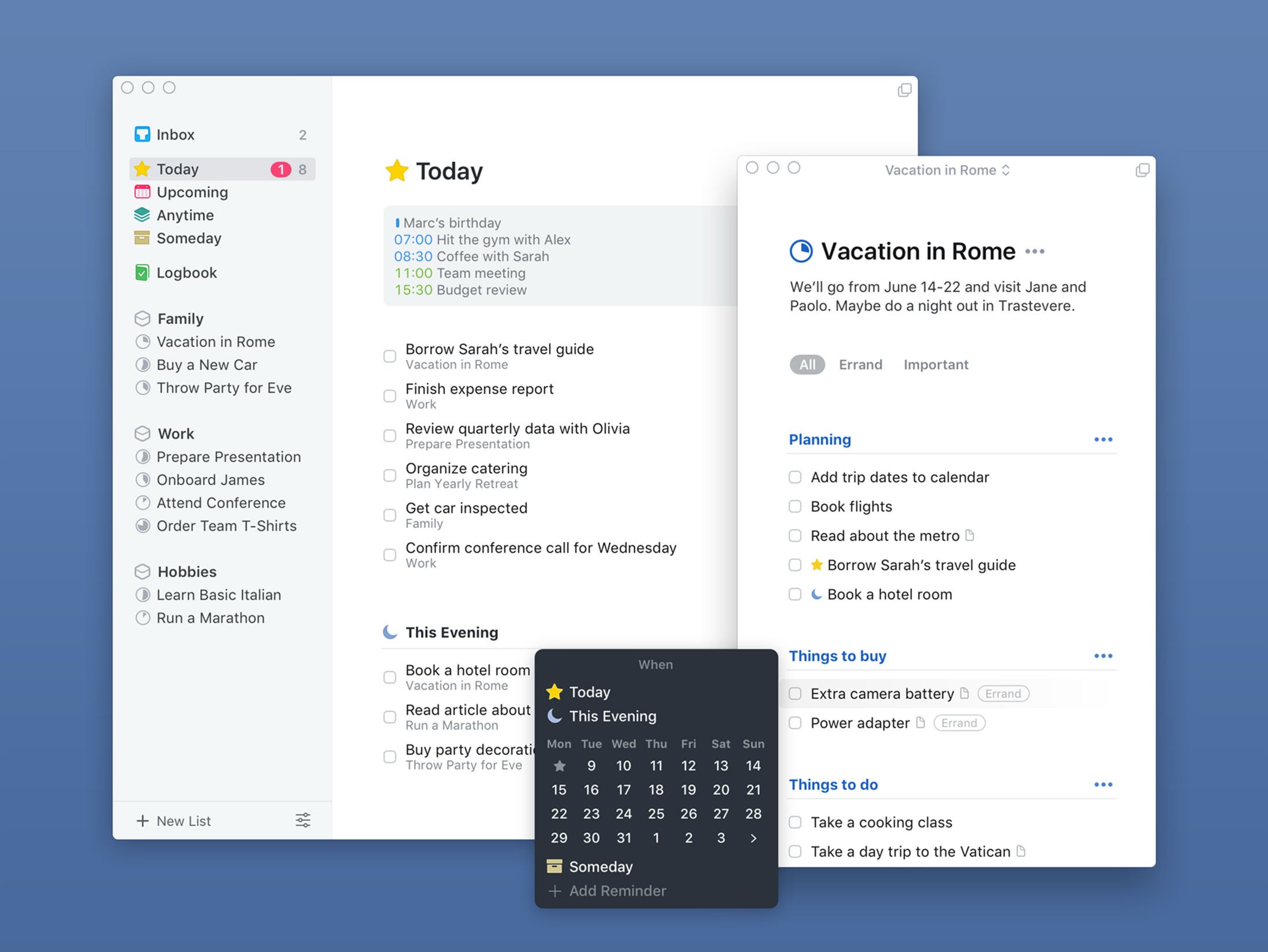
Best for: A polished Apple task planner.
Things 3 is an award-winning, Apple-only task manager with one of the cleanest designs anywhere. It organizes work into Areas, its own take on the spheres of your life, with Projects underneath, and it shows your calendar events beside your to-dos. It is a one-time purchase prized for how good it feels to use.
Strengths:
Areas group your tasks by sphere of life, the closest a task manager here comes to life areas.
A clean Today view that shows calendar events above your to-dos.
A one-time purchase with no subscription.
Limitations:
Apple-only, with no Android, Windows or web.
Areas group but do not connect to a goal, and there are no habits or long-term horizons.
Pricing: One-time purchase, no subscription: iPhone $9.99, iPad $19.99, Mac $49.99
Platforms: iOS, iPad, Mac
Rating: 4.8 on the App Store (US storefront, 28,000 ratings, August 2026)
Bottom line: Pick Things 3 if you are all-in on Apple and want the most polished task planner, with Areas to sort your life. If you want goals, habits or other platforms, it is not built for that.
Motion
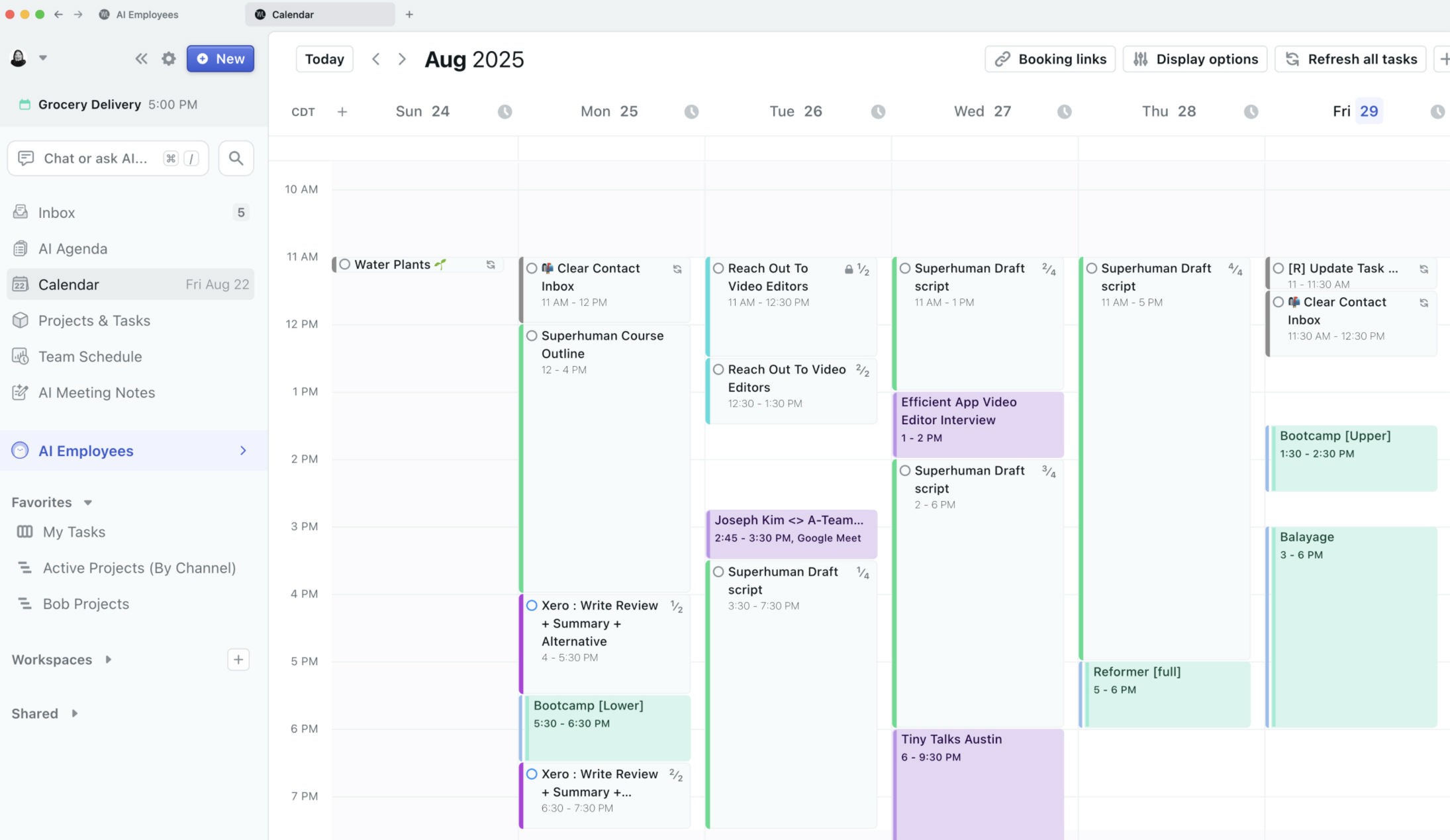
Best for: Letting AI schedule your work.
Motion hands the planning to software: its AI takes your tasks, projects and deadlines and time-blocks them onto your calendar, re-optimizing as the day changes. It is aimed at people who would rather approve a schedule than build one, and who live mostly on a computer. It organizes your working hours well, less so the life around them.
Strengths:
Fully automatic AI scheduling that time-blocks your tasks and re-plans the day.
Combines tasks, projects and calendar into one auto-built view.
Runs across iOS, Android, Windows and the web.
Limitations:
No goal, life-area or habit layer; it schedules from priority and deadlines.
No free plan, and the mobile app is a companion to the computer version.
Pricing: No free plan (7-day trial); from $19/month billed yearly on Motion's site, higher via in-app purchase
Platforms: iOS, Android, Windows, web
Rating: 4.1 on the App Store (US storefront, 1,900 ratings, August 2026)
Bottom line: Pick Motion if you want an AI to build and defend your working calendar. If you want to organize a life rather than a workday, its automation is not aimed there.
Any.do
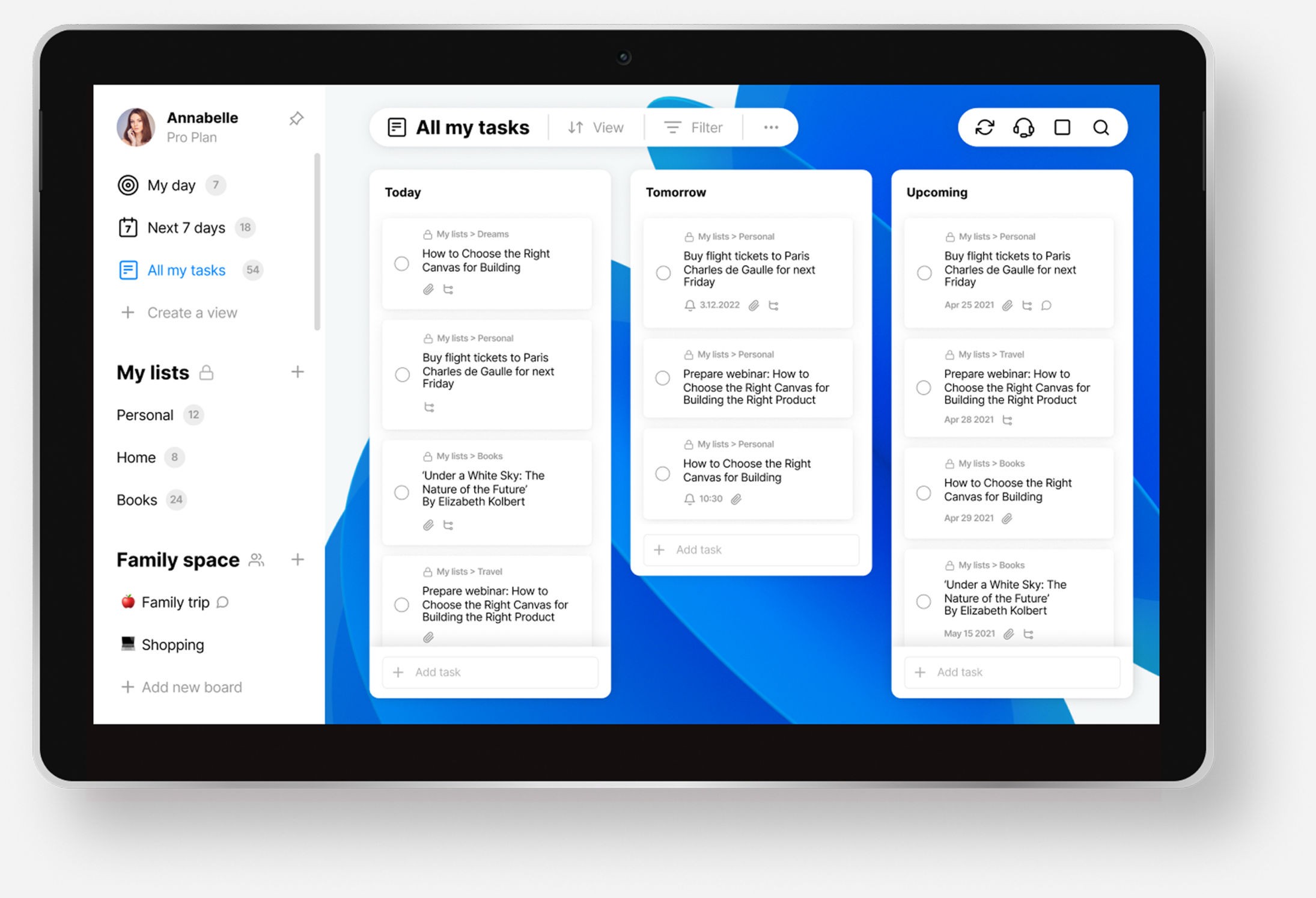
Best for: A simple, free organizer.
Any.do combines a to-do list, calendar and reminders into one clean, free app, with a "My Day" view that asks you to pick today's priorities. It shows your tasks and events together and keeps the essentials on the free plan. It suits people who want a light, no-cost place to keep life in order.
Strengths:
A genuinely free organizer, with tasks, reminders and a calendar in one.
Shows your calendar events and to-dos together.
Broad reach across iOS, Android, Mac, Windows and the web.
Limitations:
No goal or life-area layer, and its AI only suggests and breaks down tasks.
It organizes into flat lists, so nothing connects the day to a larger life.
Pricing: Free plan; Premium $7.99/month or $4.99/month billed yearly
Platforms: iOS, Android, Mac, Windows, web
Rating: 4.6 on the App Store (US storefront, about 50,000 ratings, August 2026)
Bottom line: Pick Any.do if you want a free, simple list and calendar to keep life tidy. If you want areas, goals or long-term planning, it stays basic.
How to choose
The right life planner depends on how far ahead you want to plan and how much structure you want built in.
If you want your day tied to measurable life goals, pick Griply. It runs on life areas and connects your tasks up to the goals behind them.
If you think in years and decades, pick Timestripe for its day-to-lifetime Horizons.
If you want to design your own system, pick Notion for its databases and templates, or ClickUp if it doubles as your work tool.
If you want a cheap all-in-one on any device, pick TickTick.
If you want a calm weekly ritual, pick Sunsama.
If you are all-in on Apple, pick Things 3 for its Areas and polish.
If you want something free and simple, pick Any.do.
Why a tidy system is not an organized life
The strange thing about organizing your life is that you can do it perfectly and still feel lost. You sort every list, label every note, color-code the calendar, and a month later the projects that matter have not moved and the year is drifting. A tidy system is not an organized life. Most of these apps are built to arrange what is in front of you, and they arrange it well, but arranging is not the same as directing, and the life you are actually trying to build stays in your head, disconnected from the app doing the sorting.
The clearest sign is what each of these apps chooses to connect. Todoist built a way to link tasks to a goal and then retired it. Task managers like Things 3 and Motion organize the surface superbly and stop there. Notion and ClickUp hand you the pieces and ask you to assemble the meaning yourself. Only two apps here start from the life rather than the list: Timestripe lines your days up under goals that run to your lifetime, and Griply hangs the whole system off life areas, so a task can show the goal and the part of your life it serves. That is the difference between an app that keeps you tidy and one that keeps you pointed somewhere. When the year ends, the question is not whether your lists were clean, and a well-sorted app cannot answer it. A life planner should show you whether you moved the life you meant to build.
Organize your life around what actually matters
Griply is for people who want their days to add up to a life they chose rather than a tidy set of lists. If that is you, it is free to start, and there is nothing to lose in setting up one life area around a real goal this week.
Start for free, and if you want ideas or accountability, come say hello in the Griply community.
What is the best app to organize your life?
Griply is the best for organizing life around goals, since it runs on life areas and connects your tasks up to the goals behind them. Timestripe is best for long-horizon planning, Notion for designing your own system, and TickTick for a cheap all-in-one.
What is a life OS?
A life OS, or life operating system, is a single app or system that holds all the parts of your life, your goals, projects, tasks, habits and notes, in one connected structure. Griply is a goal-first life OS; Notion is a build-your-own one.
What is the best free app to organize your life?
Any.do and Notion have the most capable free tiers, and TickTick's free plan is useful too. Griply's free plan covers two goals and two habits with the life-area structure, enough to organize one part of your life.
What is the difference between a life planner and a to-do list app?
A to-do list captures what you need to do. A life planner organizes those tasks into the bigger picture, usually by life area and long-term goal, so today connects to the life you are building. Most to-do apps stop at the list.
Can you use Notion as a life planner?
Yes, Notion can model an entire life system with its databases and templates, and many people do. The trade-off is that you design and maintain the structure yourself, and nothing connects your day to a goal unless you build that link.
What is the best life planner for long-term goals?
Timestripe is built for this, with five horizons from day to lifetime that put today under your long-term aims. Griply also pairs a long-term vision with a goal roadmap over months and years, and adds measurable goal progress.
Is there a life planner app for Android?
Notion, ClickUp, TickTick, Todoist, Timestripe, Motion and Any.do all run on Android. Griply does not have an Android app yet, and Things 3 is Apple-only by design, so Android users should look to the others.
What is the best life planner for Apple devices?
Things 3 is the most polished Apple-only option, with Areas to sort your life, and Griply runs well on iPhone and Mac while connecting tasks to goals. Timestripe also covers iPhone, iPad and Mac.
What is the best app to connect daily tasks to long-term goals?
Griply is built for exactly this: your tasks and habits can link up to a goal and a life area, and the goal carries a metric you can chart. Timestripe connects them by time horizon instead, from day to lifetime.
